

/environments - reach it from the Environments card on the Home page or the Environments item in the sidebar.
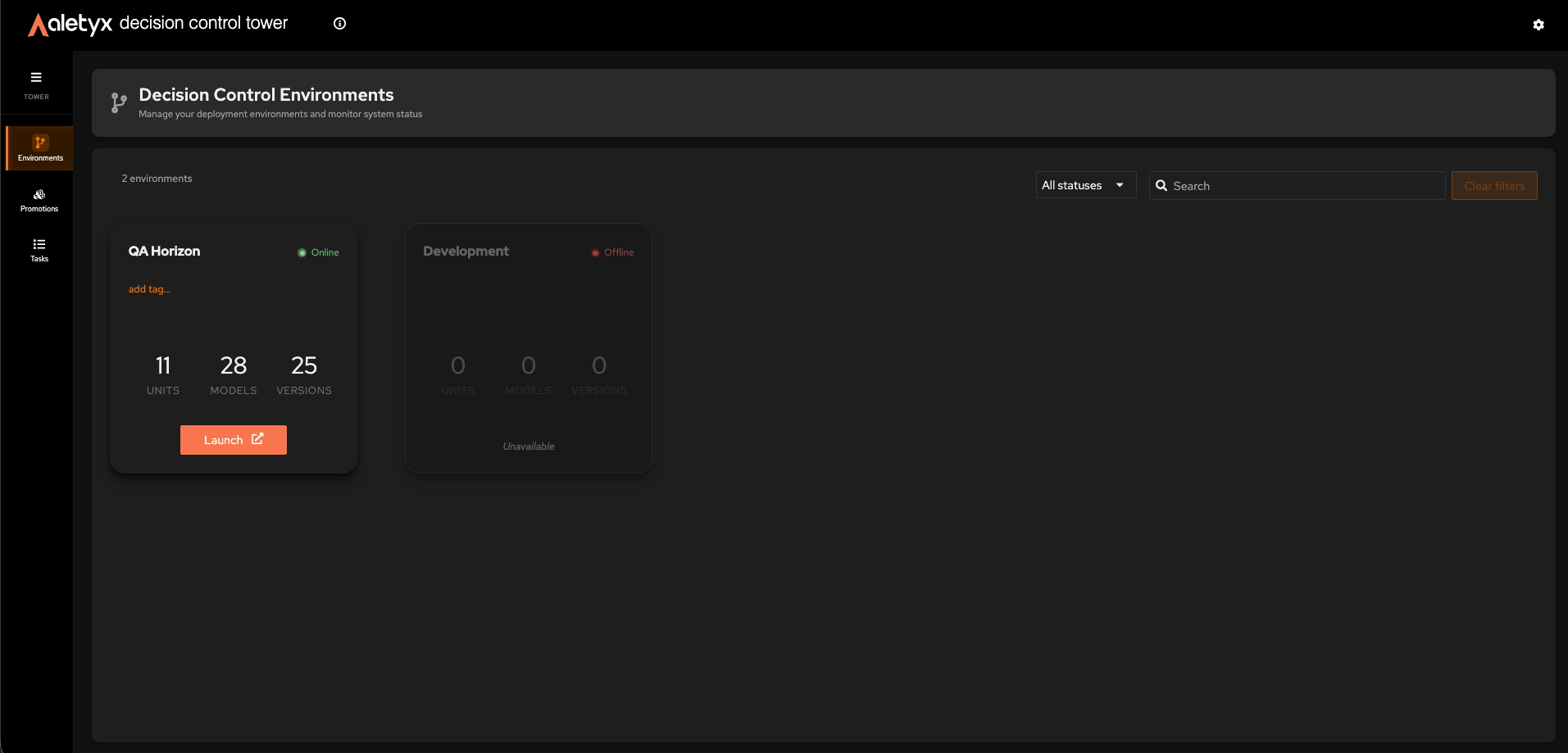
How to browse environments
See all Decision Control environments and their health at a glance. Steps:- Open Environments (from the Home page card or the sidebar) - the page header shows a branch icon and title Decision Control Environments above the environment cards.
- Read each card’s status badge (online / offline) and Units / Models / Versions stats.
{N} environments”.
How to find an environment
Narrow the grid with the toolbar filters and search.- Filter by status
- Filter by tag
- Search by name
- Open the status dropdown (defaults to All statuses).
- Choose Online or Offline.
{filtered} of {total}”. A count badge on the tag picker shows how many tags are active.
How to add a tag to an environment
Label an environment for organization and filtering. Prerequisites: The environment is online; fewer than 6 tags already applied. Steps:- On the environment card, click add tag….
- Type a name in the inline tag name… field.
- Press Enter to confirm (or Esc to cancel).
How to remove a tag from an environment
Detach a previously applied tag. Prerequisites: The environment is online. Steps:- On the card, locate the tag label.
- Click its × (“Remove tag
{name}”).
How to launch an environment’s Decision Control workbench
Jump from governance into the Decision Control authoring/management app for that environment. Prerequisites: The environment is online. (Offline cards show “Unavailable” instead.) Steps:- On the environment card, click Launch (external-link icon).