

Prerequisites
Access to the Aletyx Playground — no installation or development tools required.What you’ll do
Get up and running in less than 5 minutes:1
Open the Aletyx Playground
Go to playground.aletyx.ai in your browser —
there is nothing to install and no setup required.
2
Explore a sample model
From the welcome screen, click Try Sample under the Decision section to
open the Loan Pre-qualification DMN model — a complete, working decision you
can inspect and change.
3
Model your first decision
Click New Decision to start from a blank canvas, drag inputs and decisions
onto the diagram, and capture the logic in decision tables. The
DMN tutorial walks through building a
vacation-days model step by step.
4
Test with sample data
Click Run in the top-right corner. A form appears where you enter sample
inputs, and the results update in real time as you edit the model — no
compilation or deployment needed.
5
Save and share your work
Connect the Playground to Git
to save and version your models, or download the
.dmn and .bpmn files to
hand off to your development team.Visual Decision Modeling with DMN
Create business decisions using the industry-standard
Decision Model and Notation (DMN) without
writing a single line of code.
- Drag-and-drop decision table creation
- Visual decision requirements diagrams
- FEEL expression language for business-friendly logic
- Testing and simulation capabilities
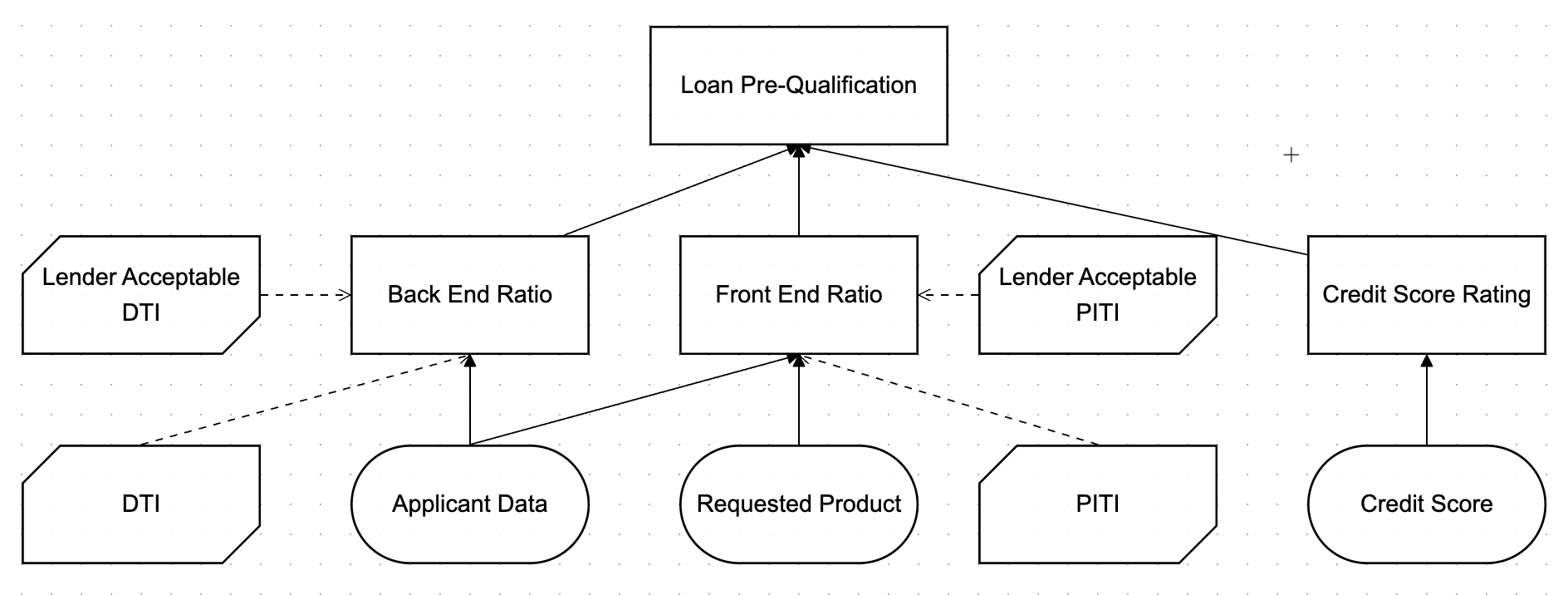
A simple DMN model: the Applicant Data input feeds a Loan Eligibility decision, whose rules live in a decision table.
Test decisions as you model
DMN models are executable as written, and the Playground includes a built-in DMN runner. Click Run, fill in a form with sample inputs — an applicant’s credit score, say — and watch the outputs update in real time as you edit decision-table cells. It’s the fastest way to validate your logic against real business examples before anything is deployed. See it in action in the tutorial’s testing walkthrough.Process Automation with BPMN


A simple BPMN process: an application is received, reviewed, and routed by a gateway to an approved or declined outcome.
Design executable business processes that orchestrate people, systems, and decisions.
- Intuitive BPMN 2.0 visual editor
- Human task management
- System integration capabilities
- Process monitoring dashboard