

Lab Overview
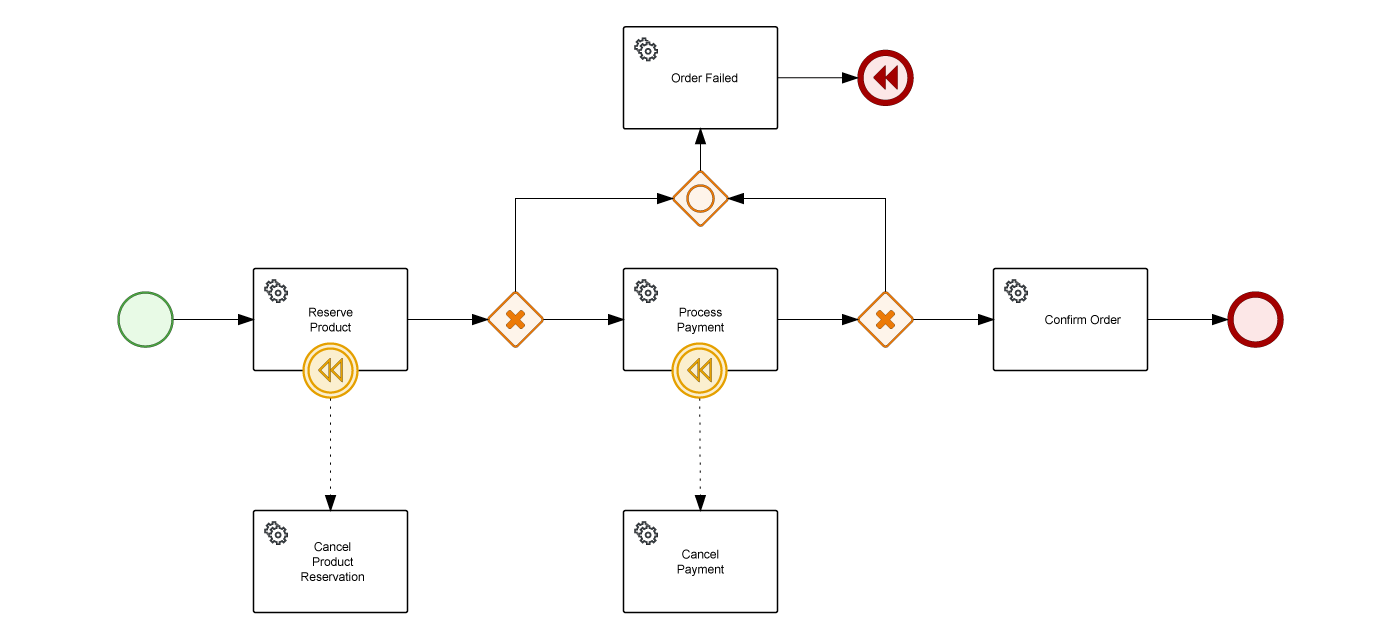
You will create a BPMN process that follows the SAGA pattern, structured with service tasks and gateways. The process will include three main steps:- Reserve Product – Reserve stock for the order.
- Process Payment – Process the payment.
- Confirm Order – Final confirmation task.
- Cancel Product Reservation
- Cancel Payment
Supporting Files
The Java services provided in the repository https://github.com/aletyx-labs/kie-10.0.0-lab-saga contain the infrastructure to support this process. Below is a brief description of each file:StockService.java
This service handles the reservation and cancellation of product stock.- reserveStock(): Attempts to reserve stock and uses the MockService to simulate success or failure.
- cancelStock(): Cancels the reserved stock if a failure occurs.
PaymentService.java
Responsible for managing payment operations, including processing and cancellation.- processPayment(): Processes the payment for the order. The result is simulated through the MockService.
- cancelPayment(): Cancels the payment if the process fails.
OrderService.java
This service provides the final status update of the order.- success(): Logs and returns a success response when the order is completed without errors.
- failure(): Logs and returns an error response when the order process fails.
Response.java
Defines a response object that all services use to indicate the result of their execution.- Type: Enum representing SUCCESS or ERROR responses.
- Utility methods like success(), error(), and isSuccess() simplify response management.
MockService.java
Simulates service execution and determines success or failure based on configuration.- execute(): Checks if the current service should fail based on the failClass parameter. It returns either a SUCCESS or ERROR response without throwing exceptions. This supports the data-driven flow approach by allowing gateways to handle decisions based on response data.
Instructions
Step 1: Clone the Repository
Clone the lab project from this repository, which contains all the necessary files and infrastructure for the lab.Step 2: Import the Project
Import the project into VS Code and explore the provided Java classes.Step 3: Create the BPMN file
Create a new file name order.bpmn under src/main/resources and open it using the Apache KIE BPMN Editor. Once file is created, create the process variables that we’ll need.Step 4: Create the process diagram
As mentioned before, the process will be data-flow based, so on every operation we’ll have the results of the execution to check if it worked or not. In case of failure, we’ll have the failure path and the compensations are expected to be executed. In general this is the nodes you’ll have to create:- Start Event: Initiates the order process.
-
Reserve Product Task
Interface: ai.aletyx.kie.workshop.saga.StockService
Operation: reserveStock
Variables - Input Mapping:
Variables - Output Mapping:
-
Exclusive Gateway: We’ll check if the Reserve was successfull or not.
-
On Fail
3.1. Create an Inclusive Gateway to consolidate actions 3.2. Create a Order Failed Task Interface: ai.aletyx.kie.workshop.saga.OrderService Operation: failure Variables - Input Mapping:Variables - Output Mapping:3.3. Create an End Compensation Node
-
On Success:
3.4. Process Payment Task Interface: ai.aletyx.kie.workshop.saga.PaymentService Operation: processPayment Variables - Input Mapping:Variables - Output Mapping:3.5. Exclusive Gateway: We’ll check if the Payment was successfull or not.
-
On Fail:
3.5.1 Connect it to the Inclusive Gateway for the Order Failed Task
-
On Success:
3.5.2. Confirm Order Task Interface: ai.aletyx.kie.workshop.saga.OrderService Operation: success Variables - Input Mapping:Variables - Output Mapping:3.5.3. End event
-
On Fail:
-
On Fail
-
Add Compensatory Tasks
5.1. Drag a compensatory catch event from palette and bound it to Reserve Product
5.2. Select the compensatory node, using the context menu, create a new task and name it Cancel Product Reservation, and change it to Service Task
Interface: ai.aletyx.kie.workshop.saga.StockService
Operation: cancelStock
Variables - Input Mapping:
5.3. Drag a compensatory catch event from palette and bound it to Process Payment 5.4. Select the compensatory node, using the context menu, create a new task and name it Cancel Payment, and change it to Service Task Interface: ai.aletyx.kie.workshop.saga.PaymentService Operation: cancelPayment Variables - Input Mapping:
Step 5: Test the Process
- Run the process in different scenarios by passing the failService parameter to simulate success and failure for specific tasks.
- Verify that compensatory actions are executed when failures occur and that the final task correctly reflects the process outcome.