

Building with the Aletyx AI Assistant: From Paperwork to Decisions
Key takeaways
- The Aletyx AI Assistant can turn policy documents into executable decision models. Compose your prompt or attach a PDF in the Aletyx Playground, describe what you want, and review the proposed model before anything is applied.
- Rule changes become conversations. You describe the change in business language, and the assistant finds where that logic lives and proposes the edit.
- Nothing changes without your approval. Every suggestion lands in a Changes panel where you accept or revert each edit individually, not as one take-it-or-leave-it bulk change.
- The assistant also generates test cases from plain-language scenarios, so every change is validated immediately: fast feedback, in authoring, before anything ships.
- The result is Accountable AI in practice: AI accelerates the work, while the decision itself stays explicit, versioned, testable, and owned by the business.
Accountable AI in regulated decisions starts with a division of labor: probabilistic AI handles the ambiguity; predictable decision models own the decision itself. The obvious follow-up question is a practical one: if the accountable layer is a decision model, who builds and maintains it, and how fast?
That’s where the Aletyx AI Assistant can help. It applies AI to the part of the work where AI belongs: reading documents, understanding language, drafting logic and test data. The output from the AI Assistant is a decision model in DMN format that you review, approve, and test before it becomes policy. The assistant combines Aletyx’s decision-authoring harness with frontier AI models: the AI drafts, the harness keeps every draft inside a governed, reviewable workflow.
Let’s go through a hands-on example, in your browser, with no code. You will:
- Turn a realistic loan policy document into a working decision model.
- Change the model’s business rules by describing the change in plain language.
- Generate test cases so that every future change is checked automatically.
Why this matters before how it works
The bottleneck in decision automation has never been execution; engines evaluate rules in microseconds. The bottleneck is authoring and change: the distance between “the credit committee approved a new threshold” and “the model in production reflects it, tested and documented.”
Traditionally that distance is translated to tickets, application changes, and release cycles. A business owner writes the policy in prose; an analyst translates it into a model or a developer translates it into code; someone else writes tests; weeks pass; meaning gets lost at every hand-off.
The AI Assistant collapses those hand-offs without collapsing the controls. The person who owns the policy works directly on the model, in business language; and every AI suggestion still passes through explicit human review, change by change. You get the speed of AI-assisted authoring and the evidence trail that accountable automation requires. Faster, with more confidence, not less.
Step 0: Open the Playground and enable the assistant
The Aletyx Playground (playground.aletyx.ai) is a free online application for authoring decision models and workflows. Everything below runs in your browser, there’s no need to install anything.
The AI Assistant itself is a subscription with a 14-day free trial. Follow the setup guide to subscribe, create an API key, and paste it into the Playground’s settings; it takes about five minutes. Open a “New Decision” and check that the Aletyx AI button in the editor opens a live chat, you’re ready.
Step 1: From policy PDF to decision model
It’s quite common for policies and decision rules to be presented in a document, like the one we’ll use: a loan pre-qualification policy describing who qualifies, based on credit score, debt-to-income ratio (DTI), and housing payment-to-income ratio (PITI). Download it here:
Loan Pre-Qualification Specification (PDF)
In short, the policy says an applicant qualifies for a loan when all three checks pass: a FICO-based credit rating of Fair or better (650+), total monthly debt obligations at or below 36% of gross monthly income, and housing payments (principal, interest, tax, insurance) at or below 28%. Any failed check means “Not Qualified”; with a specific reason.
Now let’s use the assistant build the model:
- On the Playground home screen, create a new Decision.
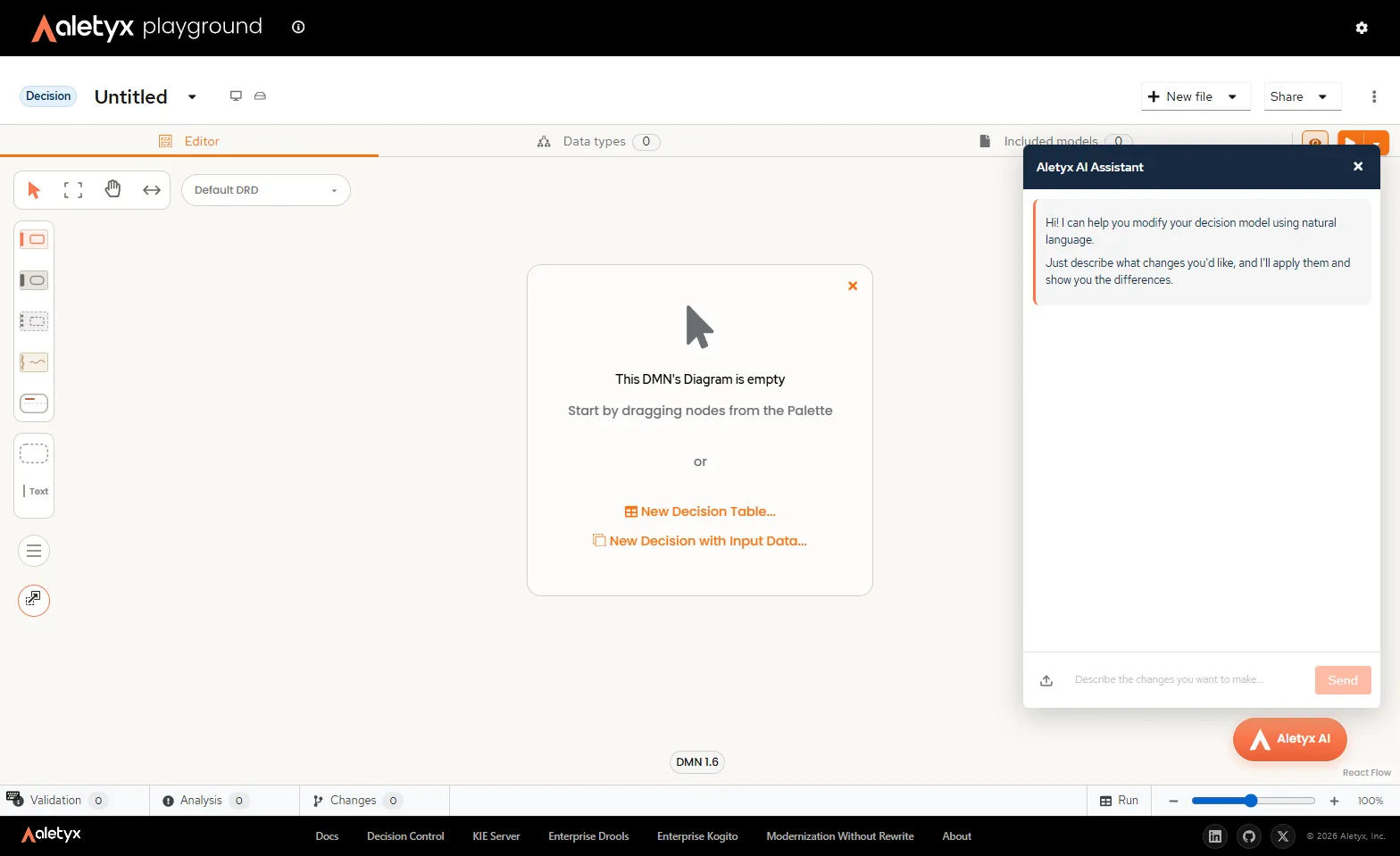
- Click the Aletyx AI button to open the assistant.
- Click the upload icon next to the message box and attach the PDF you downloaded.
- Send it with a prompt like:
Create the decision model described in this specification.The assistant reads the document and drafts the full model, including:
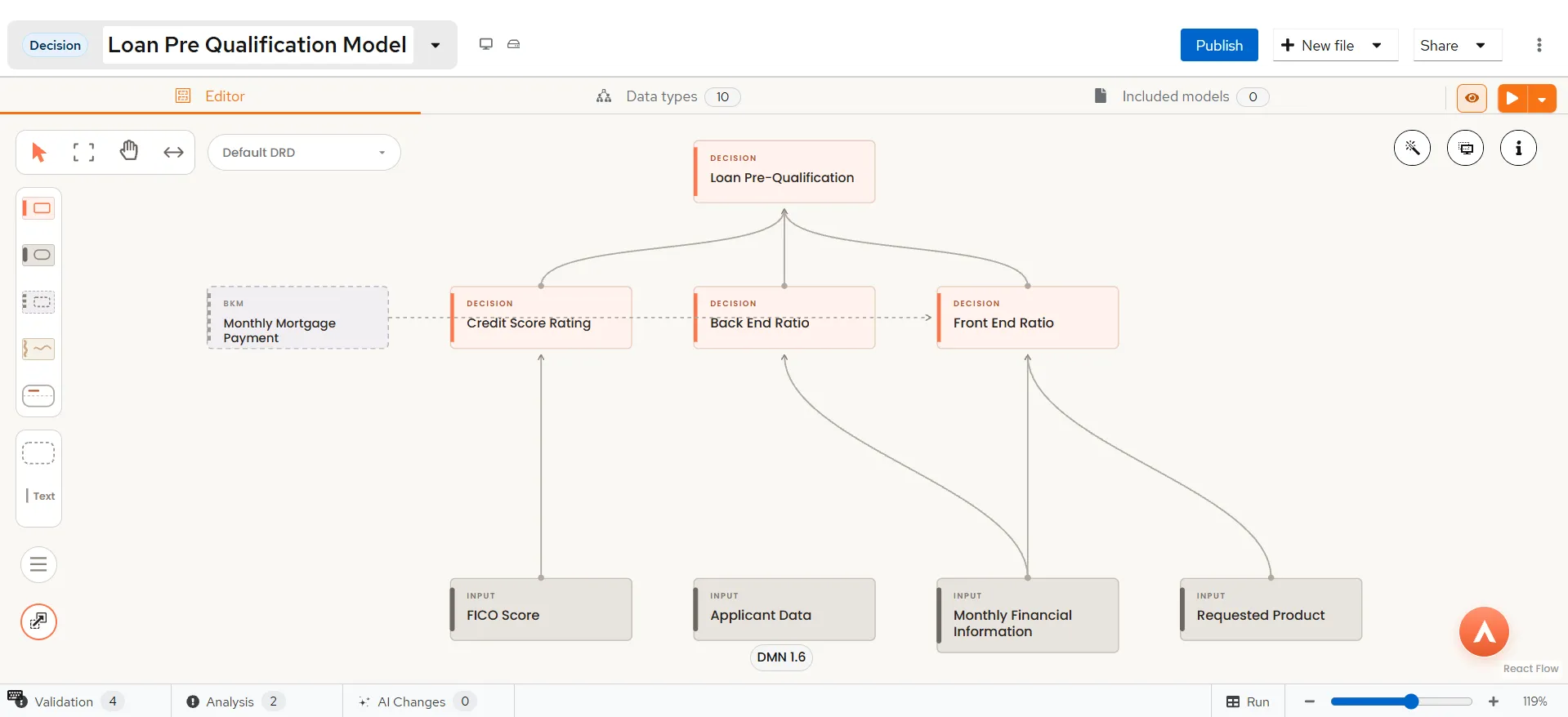
- the input nodes (Applicant Data, Requested Product, Credit Score),
- the intermediate decisions for credit rating and both ratios,
- the threshold logic,
- the final decision table that combines them with a reason for every outcome.
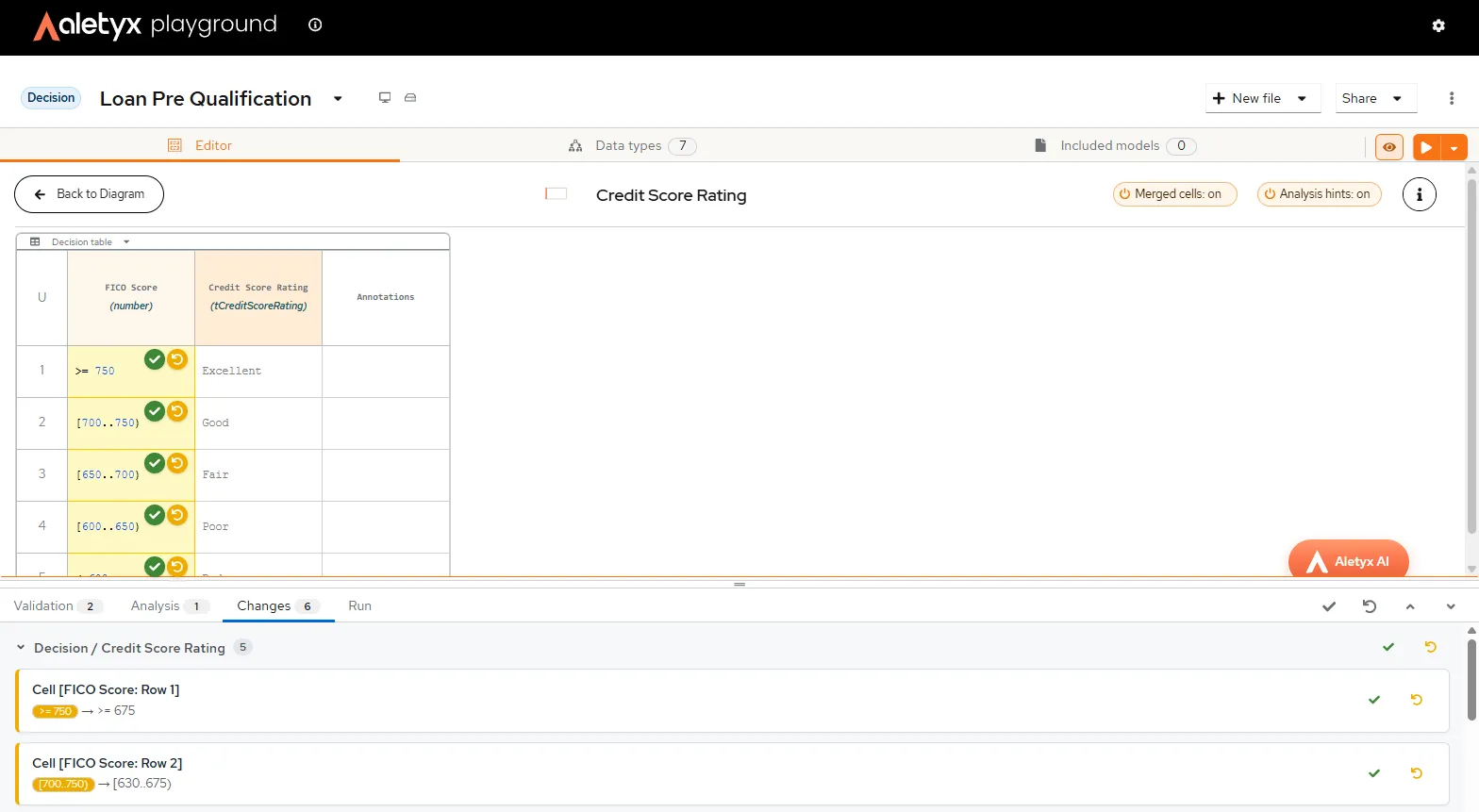
Here is the part that distinguishes this from code deployments: nothing is applied yet. Every element the assistant drafted appears as a proposed change in the Changes panel at the bottom of the editor, listed with old and new values and grouped by node, with the affected elements highlighted on the diagram. You can accept everything with one click; or accept the decision table, revert one rule, and ask the assistant to redo it. The review granularity is yours, down to the individual edit. For a business or quality assurance professional, that per-change control is the difference between “the AI changed my model” and “I changed my model, faster.”
Ask the assistant to Explain this decision model in plain language and check its walkthrough against the PDF. If the model says what the policy says, accept the changes. You’ve just turned a policy document into an executable, inspectable asset: no translation layer, no lost meaning.
Step 2: Change the rules
Policies change more often than they’re created. This is where prompt-driven authoring can help.
Suppose that the credit committee decides current housing thresholds are too restrictive and wants to allow slightly higher housing payments while keeping the DTI policy from the specification unchanged. Tell the assistant, in business terms, without naming any node:
Raise the maximum acceptable housing payment-to-income ratio to 31%.The assistant finds where that logic lives, the Lender Acceptable PITI business knowledge model, and proposes updating its value from 0.28 to 0.31. The affected node is highlighted, the Changes panel shows the old and new values, and you accept or revert. Try the same pattern with a different DTI threshold:
Lower the maximum acceptable debt-to-income ratio to 34%.The assistant should locate the Lender Acceptable DTI business knowledge model and propose updating its value from 0.36 to 0.34.
Prompts can also reach across whole tables. To loosen the credit tiers instead:
Make each tier of the credit score table 10% lower so that more applications are qualified.The assistant recalculates every boundary: Excellent moves from 750 to 675, Good to 630, Fair to 585, and Poor to 540. Each modified cell gets its own accept and revert controls.
Notice what you did not do: open a ticket, brief a developer, or explain to anyone what “DTI” means in your policy. And notice what you still did: review every value before it became part of the model.
Step 3: Generate tests and pin the expected results
A change you can’t validate is a risk, not an improvement. The assistant closes the loop by generating test cases from plain-language scenarios; the same way a user would describe them.
Ask for a case that should pass:
Generate a sample test for a qualified case considering an application with credit score of 800, earning 500000, 10% DTI, 20% PITI.The assistant produces a complete, realistic set of inputs shaped to the model’s data types, including income, expenses, debts, and credit score, designed to keep both ratios within their thresholds. You can use the “run” button in the AI Assistant or at the top of the model editor to run the tests. Then ask for a test case that should fail:
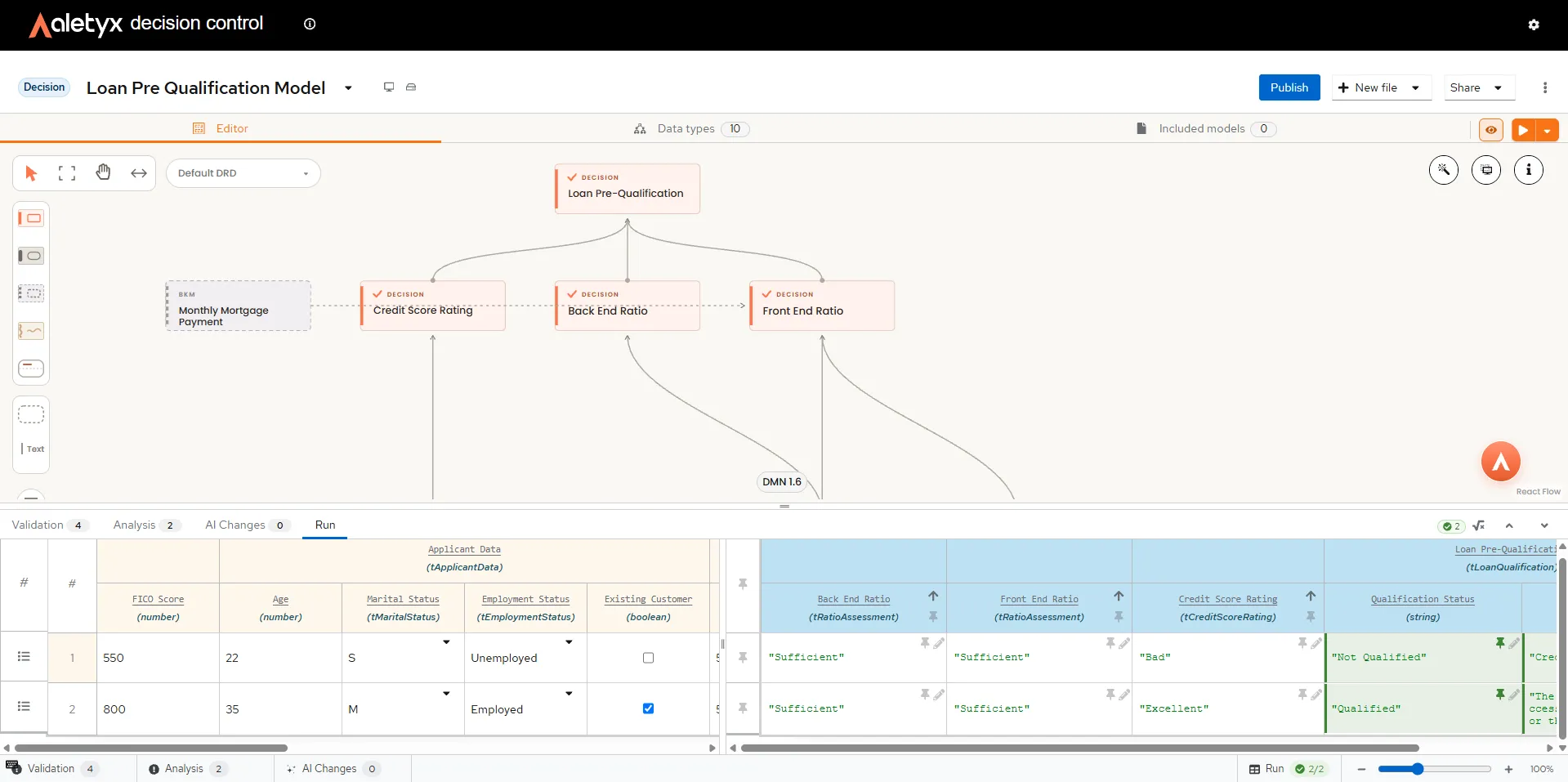
Generate a sample test for a negative case considering an application with insufficient credit score and applicant data.Load the generated inputs into the test runner (use the test button the assistant provides, or the Run button). The Run panel shows each case as a row: inputs on the left, the evaluated qualification and its reason on the right; Qualified for the positive case, Not Qualified with the specific reason for the negative one.
When a result is correct, pin it with the pin icon on the result cell. Pinned results turn the row into a proper test: every future run is checked against them, and the badge at the bottom of the editor shows how many cases pass. Now repeat Step 2, change a threshold, and run again. You see immediately which scenarios flip, before the change goes anywhere. That’s the fast-feedback loop: every rule change validated in authoring, in seconds, with tests the assistant helped you write. You can also “switch to table view” (at the top of the form), and visualize all tests as a single table.
A concrete scenario: Friday’s policy memo, Monday’s model
Picture a regional lender’s credit risk team. On Friday, the committee approves a memo: tighten the DTI limit from 36% to 34% for standard loans, effective next quarter, in response to portfolio delinquency trends.
The old way would be somewhat like this: the memo goes to IT as a change request. A developer locates the threshold, hopefully in one place, changes it, and schedules the update in the next release, four weeks out. QA writes test cases from the memo. Somewhere in the translation, “monthly debt obligations” gets interpreted slightly differently than the policy intended, and the discrepancy surfaces in production.
With the AI Assistant: on Monday, the credit policy analyst opens the model, types the change in the same words the memo uses, and watches the assistant locate the Lender Acceptable DTI threshold and propose 0.36 to 0.34. They review the diff, accept it, and run the pinned test suite. Two previously qualifying scenarios now come back “Not Qualified; debt to income ratio is too high,” exactly as the committee intended. This could get done in under an hour, with evidence produced along the way: the exact change, who approved it, and the tests that verify it.
Accountable AI, from authoring to runtime
This scenario depicts Accountable AI in practice; applied to loan decisions, but extensible to how decision logic gets built and maintained:
- Explainable. The model is a readable DMN diagram, and the assistant explains it in plain language on demand.
- Repeatable. The decision logic returns the same result for the same inputs, every time; the AI only drafts, never decides.
- Auditable. Every AI suggestion is an explicit, reviewable change with old and new values; accepted by a human, at whatever granularity the human chooses.
- Governed. Tests generated in the same conversation validate every change before it moves on; in Aletyx Decision Control, the same models then flow through versioned, approval-gated promotion to production.
Frequently asked questions
Do I need to know DMN or FEEL to use the AI Assistant?
No. You describe what you want in business language. Attach any supporting document, or type the rule change in the same words your policy uses, and the assistant drafts the model elements for you. The result is standard DMN you can read on the diagram, so understanding grows as you go, but it isn’t a prerequisite.
Does the assistant change my model on its own?
No. The assistant only proposes changes. Every suggestion appears in the Changes panel with its old and new values, and nothing is applied until you accept it; per change, per group, or all at once. Reverting a change discards it and restores the previous value.
What file types can I attach?
PDFs, spreadsheets, CSVs, and images; policy documents, decision tables, rate sheets and other related documents.
How do the generated tests keep protecting me after this session?
When you pin a correct result in the Run panel, it becomes an expected value: every future run of the model is checked against all pinned cases, and the pass badge tells you instantly if a change broke an established scenario.
Is this the same as letting an AI make lending decisions?
No, it’s closer to the opposite. The AI helps you author the decision model; the model, not the AI, evaluates every application, producing identical outputs for identical inputs with a stated reason. That separation, AI for the ambiguity and predictable models for the accountable decision, is what makes the approach defensible to auditors and regulators.
What do I need to try this myself?
A browser and about twenty minutes. The Aletyx Playground is free; the AI Assistant has a 14-day free trial; the setup guide walks you from zero to your first conversation with the assistant.
Download the Loan Pre-Qualification Specification, open the Aletyx Playground, and build it yourself; the AI Assistant docs have the full prompt and testing guides.
About the author