AI Assistant for your business rules

Model in minutes. Trust, but verify.

A general AI chat can write rules. AI Assistant also validates them, tests them, and shows you exactly what it changed. You approve every edit.

Have a spreadsheet, a policy document, or an existing model? Start there.

$95per user / month

Free for 14 days, in your browser. Card required, nothing charged until the trial ends.

Explore what you can do
DMNdiscount-policy.dmn
autosaved · just now
EditorData types 4Included models 0
Decision table
UINPUTCustomer TypeOrder.Customer TypeINPUTOrder SizeOrder.Order SizeOUTPUTDiscount RateApplicable Discount RateANNOTATIONSource
1"Business"< 100.15Section 4, Rule 1
2"Business">= 100.20Section 4, Rule 2
3"Private"—0.10Section 4, Rule 3
Validation 0Analysis 1DMN 1.6
Ask for the coverage you need.

Ask the assistant to cover the policy’s branches and boundary conditions.

Why AI Assistant

Why not a general AI chat?

A general assistant writes plausible rules and leaves the checking to you. AI Assistant is built for decision modeling, so you can trust, but verify.

Aletyx is the main team behind Drools, building the most advanced AI decisioning for agents I've seen.

Paul VincentIndependent analyst, ex-Gartner
  • Validates the modelFinds errors, gaps, and overlaps before anything runs.
  • Tests itGenerates cases for your rules and boundaries, runs them, and saves the expected results.
  • Shows what changedCompare every proposed edit with the current model, then accept or revert it.
  • Keeps the sourceEach rule stays linked to the policy or spreadsheet it came from.
  • Knows the craftDecision-modeling best practices are built in, so your models stay clean as they grow.
Understand

Ask how it works. Get a straight answer.

Ask why your model returns a result. AI Assistant explains the rules in plain language, and nothing in your model changes.

DMNdiscount-policy.dmn
autosaved · just now
Included models 0
1. Default DRD K
Evaluates each valid Business or Private customer order and returns the revised discount rate together with the policy rule that applies.
KNOWLEDGEDiscount Policy Revision 1
INPUTOrder
DMN 1.6
100%
Validation 0Analysis 1 Changes 0DMN 1.6
Start with a question.

Ask why the model produces a result. You can explore its rules without editing them.

Test

Build test coverage. Spot mistakes early.

Ask AI to generate cases for your rules and boundary conditions. Review the expected outcomes, run the suite, and see when a change affects the results.

DMNdiscount-policy.dmn
autosaved · just now
EditorData types 4Included models 0
Decision table
UINPUTCustomer TypeOrder.Customer TypeINPUTOrder SizeOrder.Order SizeOUTPUTDiscount RateApplicable Discount RateANNOTATIONSource
1"Business"< 100.15Section 4, Rule 1
2"Business">= 100.20Section 4, Rule 2
3"Private"—0.10Section 4, Rule 3
Validation 0Analysis 1DMN 1.6
Ask for the coverage you need.

Ask the assistant to cover the policy’s branches and boundary conditions.

Create

Turn what you have into a model.

Start with the policy or spreadsheet you already use. Get a decision model you can inspect and test, without entering every rule by hand.

From a spreadsheet

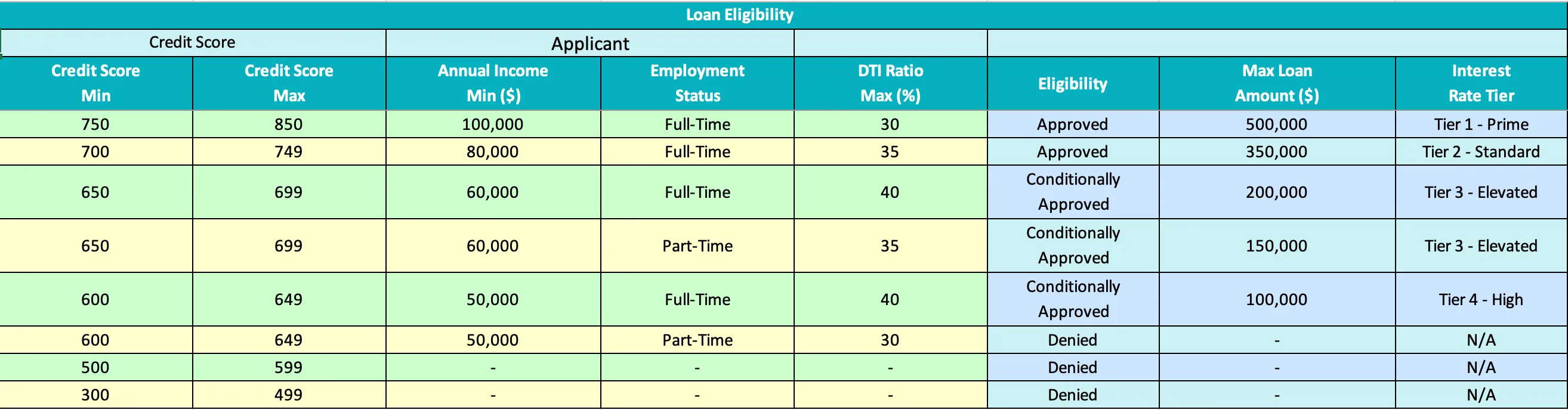
Keep the logic. Skip the transcription.

Attach your spreadsheet and ask AI to build the model. Review the generated rules without copying each row by hand.
DMNloan-eligibility.dmn
autosaved · just now
EditorData types 4Included models 0
This DMN’s Diagram is emptyStart by dragging nodes from the Palette.orNew Decision Table
Validation 0Analysis 1DMN 1.6
Start from the spreadsheet you already use.

Attach your source and ask AI to create or update the model. Open the attachment to inspect it.

From a document

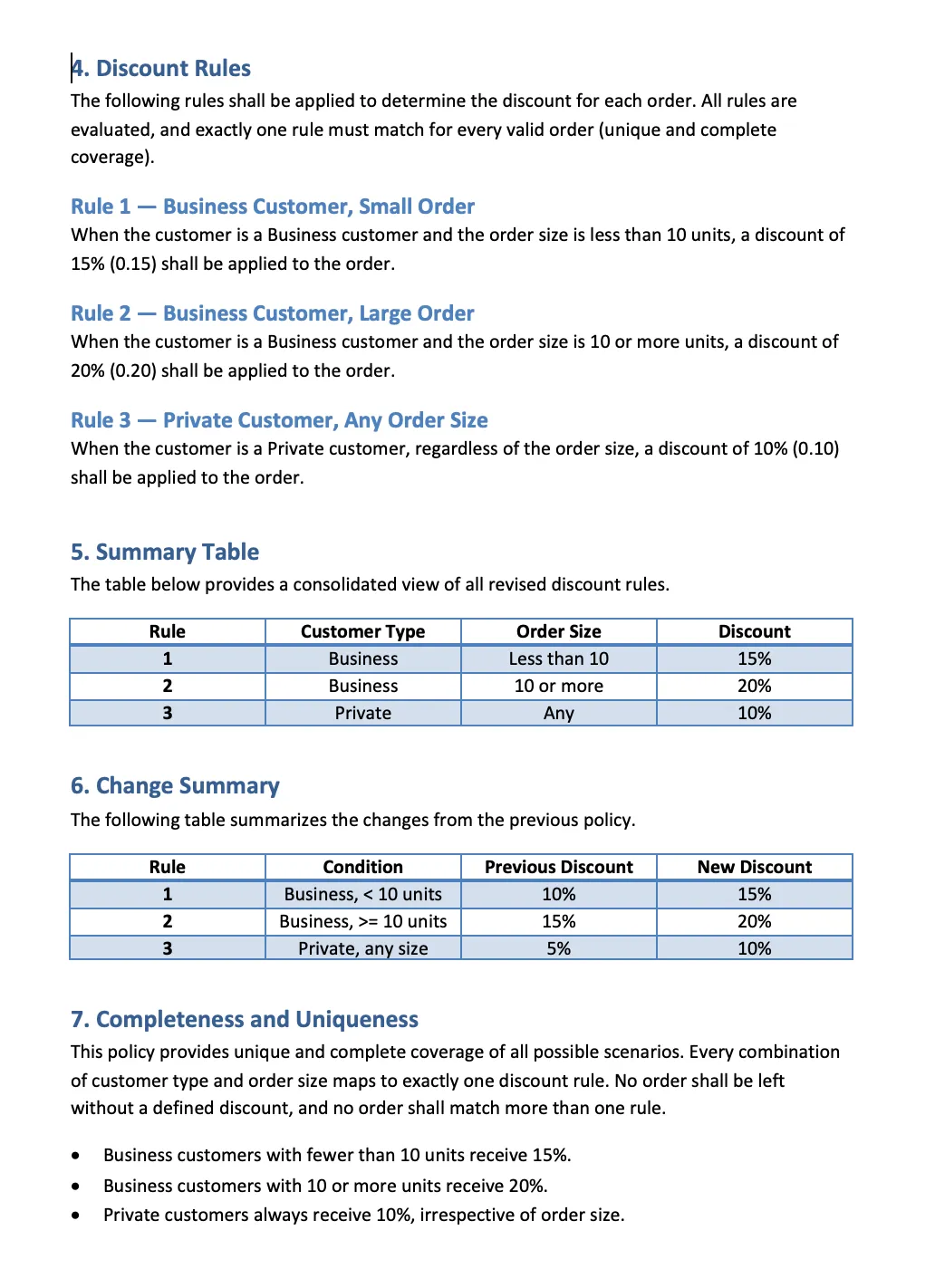
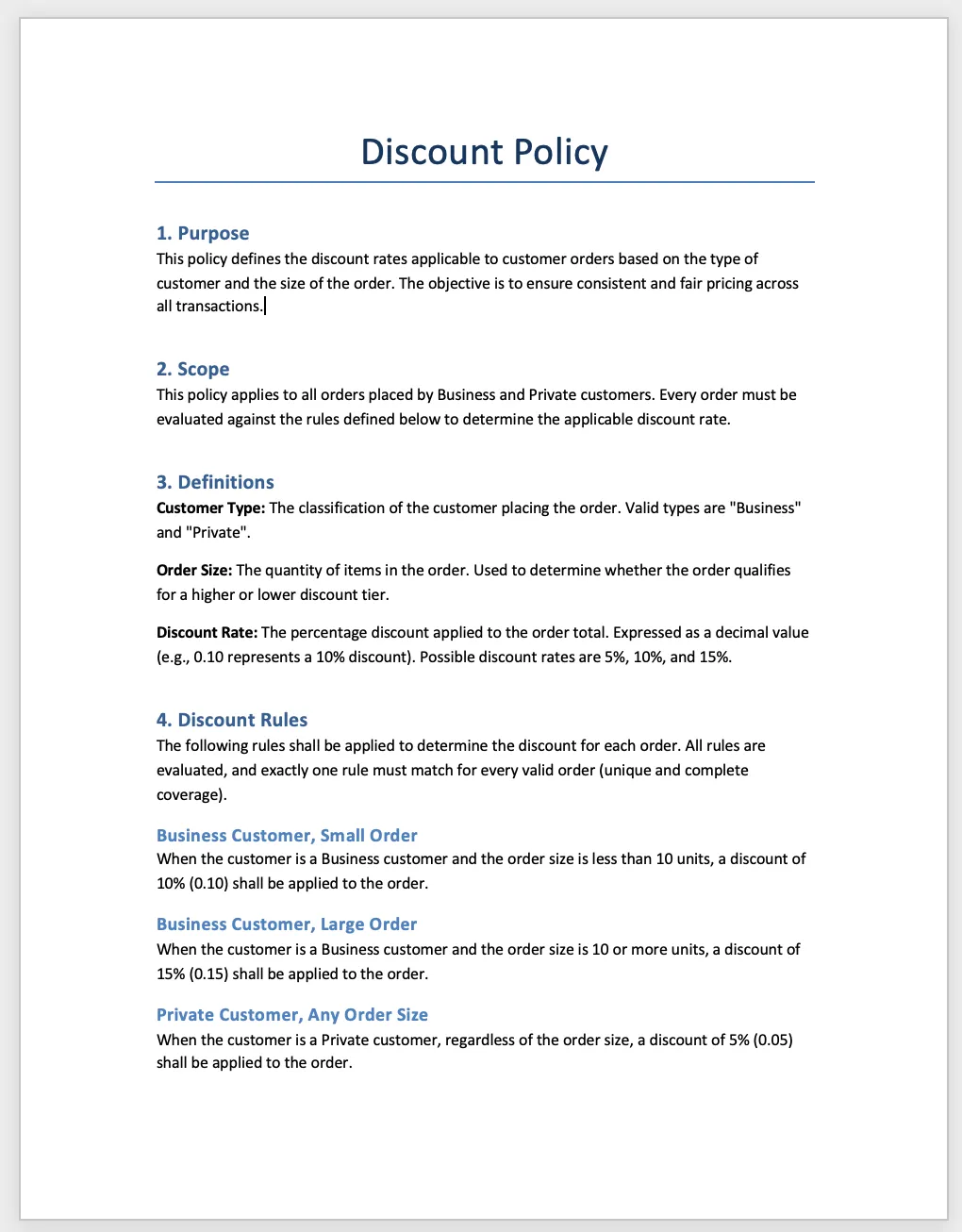
Start from the policy. Review the model.

Attach your policy and ask AI to turn it into a decision model. Inspect the rules and compare them with the source.
DMNdiscount-policy.dmn
autosaved · just now
EditorData types 4Included models 0
This DMN’s Diagram is emptyStart by dragging nodes from the Palette.orNew Decision Table
Validation 0Analysis 1DMN 1.6
Start from your policy document.

Attach your source and ask AI to create or update the model. Open the attachment to inspect it.

Change

Make the change. Keep control.

Changing one rule can affect other parts of your model. A missed edit can leave you with the wrong result.

Ask AI to prepare the related edits together. Compare before and after, then choose what to apply.

DMNdiscount-policy.dmn
autosaved · just now
DECISION · literal expressionApplicable Discount Rate
INPUT DATAOrder
DMN 1.6
Two decision tables share one Discount Rate type
Validation 0Analysis 1DMN 1.6
Ask for one change that touches two tables.

One request covers two decision tables, the shared data type, and the diagram.

Change from a document

Your policy changed. See what needs updating.

Attach the revised policy to your existing model. Review the proposed changes against the document before applying them.

DMNdiscount-policy.dmn
autosaved · just now
EditorData types 4Included models 0
Decision table
UINPUTCustomer TypeOrder.Customer TypeINPUTOrder SizeOrder.Order SizeOUTPUTDiscount RateApplicable Discount RateANNOTATIONSource
1"Business"< 100.10Section 4, Rule 1
2"Business">= 100.15Section 4, Rule 2
3"Private"—0.05Section 4, Rule 3
Data type / Discount RateAllowed values
0.05, 0.10, 0.15
Validation 0Analysis 1DMN 1.6
Start from the revised policy.

Attach your source and ask AI to create or update the model. Open the attachment to inspect it.

Get started

Start in your browser. Nothing to install.

Use AI Assistant in Aletyx Playground or inside Aletyx Platform. The Playground workspace is free; your subscription adds the assistant.

AI Assistant

Start with the model you already have.

Ask questions and generate tests first. Create or change models as you build confidence.

$95per user / month

Cancel anytime. You won’t be charged during your trial.

What you can do:

  • Ask questions about your model’s logic
  • Generate and run multiple test cases
  • Create models from policies, spreadsheets, or prompts
  • Review proposed edits across an existing model
  • Use AI Assistant in Aletyx Playground
  • Download your DMN models and run them on compatible runtimes

Credit card required. Usage limits apply. Prices shown don’t include applicable tax. Prices and plans are subject to change at Aletyx’s discretion.

Keep what you build. Download your models and choose where they run.

Frequently asked questions

What to know before you try AI Assistant.

01Do I need Aletyx Platform to use AI Assistant?
No. You can use AI Assistant directly in Aletyx Playground, the free hosted modeling workspace. The Playground costs nothing; AI Assistant itself needs a subscription. Aletyx Platform users can also use the assistant in the model editor, and developers can use it through the Aletyx Extension for VS Code, IntelliJ, and Cursor.
02Can I run the resulting models outside Aletyx?
Yes. AI Assistant works with the DMN standard. You can download your models and run them in any compatible DMN runtime.
03How does AI-assisted validation work?
Ask AI Assistant to generate test cases for the model’s rules and boundary conditions. Review and save the expected results, then run the cases against the model. Saved tests help you spot changed behavior when the model is updated; generated tests still need your review.
04How is my content handled?
It is used to produce your answer, nothing else. We don’t train on it, and our model providers can’t either. Your models and the output are yours. Keep personal data out of it, and keep your own copies of what you build.
05How does additional usage work?
Your subscription includes AI usage, subject to limits. If you need more, you can purchase additional usage. Current rates are shown before purchase.
06What happens after the free trial?
A credit card is required to begin the 14-day trial, but you will not be charged during it. Cancel anytime before the trial ends. Otherwise, the subscription continues at $95 per user per month, plus applicable tax.
07Can I use AI Assistant in my IDE?
Yes. Developers can access AI Assistant using the Aletyx Extension from their preferred IDE: VS Code, IntelliJ, and Cursor. It is also available in Aletyx Playground and Aletyx Platform.

Start with a question.

Understand your rules, test the results, and review changes before applying them. Bring a model to Aletyx Playground and start with a question.

$95 per user/month after the trial. Cancel anytime.