> ## Documentation Index
> Fetch the complete documentation index at: https://aletyx.ai/docs/llms.txt
> Use this file to discover all available pages before exploring further.

# Quickstart for Decision Analysts

> Decision-analyst quickstart: model and test business decisions and processes visually in the Aletyx Playground, with no coding or installation required.

This path is for **decision analysts** who model business decisions and processes
without writing code, using the visual [Aletyx Playground](https://playground.aletyx.ai).

## Prerequisites

Access to the [Aletyx Playground](https://playground.aletyx.ai). No development tools required.
Get up and running in less than 5 minutes:

* Access Aletyx Playground - no installation required
* Create a new project or use a starter template
* Model your first decision or process
* Test with sample data
* Export or deploy your solution

## Visual Decision Modeling with [DMN](/docs/faq/concepts/what-is-dmn)

<div className="grid md:grid-cols-2 gap-8 items-center my-8">
  <div>
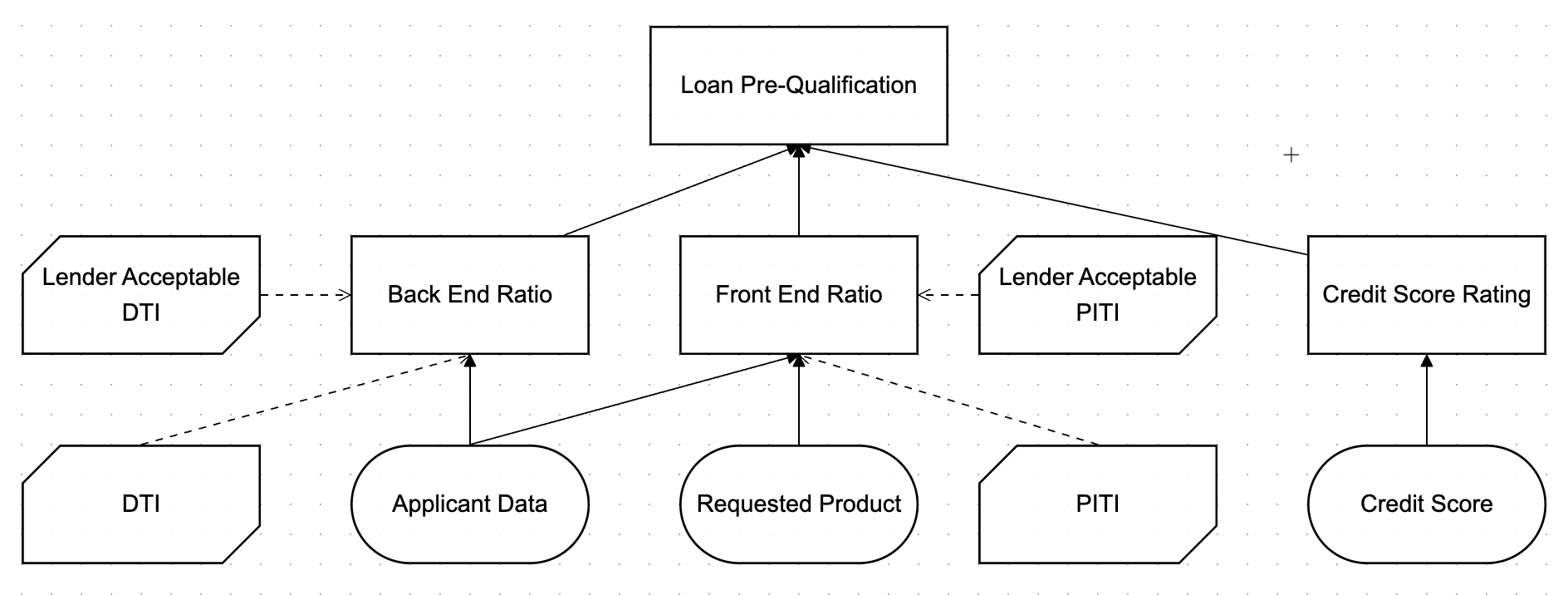
    Create business decisions using industry-standard Decision Model and Notation (DMN) without writing a single line of code.

    * Drag-and-drop decision table creation
    * Visual decision requirements diagrams
    * FEEL expression language for business-friendly logic
    * Testing and simulation capabilities

    <div className="btn-links">
      [Start with DMN](/docs/components/playground/dmn-tutorial)
    </div>
  </div>

  <Frame caption="A simple DMN model: the Applicant Data input feeds a Loan Eligibility decision, whose rules live in a decision table.">
    <img src="https://mintcdn.com/aletyx-3353d50c/ofr1TVSA8RUT0-Zd/images/dmn-editor-sample.png?fit=max&auto=format&n=ofr1TVSA8RUT0-Zd&q=85&s=e3771956b26b92f53442eef2346f6e55" alt="DMN example showing a decision requirements diagram and a loan eligibility decision table" width="1888" height="716" data-path="images/dmn-editor-sample.png" />
  </Frame>
</div>

## Process Automation with BPMN

<div className="grid md:grid-cols-2 gap-8 items-center my-8">
  <Frame caption="A simple BPMN process: an application is received, reviewed, and routed by a gateway to an approved or declined outcome.">
    <img src="https://mintcdn.com/aletyx-3353d50c/ONJZgSHm4m5typWw/images/bpmn-editor-sample.svg?fit=max&auto=format&n=ONJZgSHm4m5typWw&q=85&s=1251b2c34d28889de24fa43d3da16e7a" alt="BPMN example showing a start event, a review task, an exclusive gateway, and approved or declined end events" className="block dark:hidden" width="1558" height="609" data-path="images/bpmn-editor-sample.svg" />

    <img src="https://mintcdn.com/aletyx-3353d50c/8C2bz8uAU-JqTpba/images/bpmn-editor-sample-dark.svg?fit=max&auto=format&n=8C2bz8uAU-JqTpba&q=85&s=62e1287c6fd5a94d5c4c8b0be3f00bc3" alt="BPMN example showing a start event, a review task, an exclusive gateway, and approved or declined end events" className="hidden dark:block" width="1558" height="609" data-path="images/bpmn-editor-sample-dark.svg" />
  </Frame>

  <div>
    Design executable business processes that orchestrate people, systems, and decisions.

    * Intuitive BPMN 2.0 visual editor
    * Human task management
    * System integration capabilities
    * Process monitoring dashboard

    <div className="btn-links">
      [Start with BPMN](/docs/components/playground/dmn-tutorial)
    </div>
  </div>
</div>

## Real-World Use Cases

<CardGroup cols={2}>
  <Card title="Lending Automation" icon="building-columns" href="/docs/guides/use-cases/lending">
    Streamline loan origination and approval with rules-based decisioning and process orchestration.
  </Card>

  <Card title="Claims Processing" icon="file-shield" href="/docs/guides/use-cases/insurance">
    Automate insurance claims with dynamic routing, risk assessment, and straight-through processing.
  </Card>

  <Card title="Customer Onboarding" icon="user-plus" href="/docs/guides/use-cases/onboarding">
    Create frictionless customer experiences with intelligent workflows and AI-assisted verification.
  </Card>

  <Card title="Regulatory Compliance" icon="scale-balanced" href="/docs/guides/use-cases/compliance">
    Ensure compliance with complex regulations through auditable decisions and adaptive processes.
  </Card>
</CardGroup>

## Ready for the next steps?

<CardGroup cols={2}>
  <Card title="1. Try Aletyx Playground" icon="browser" href="https://playground.aletyx.ai">
    Model decisions and processes in your browser.
  </Card>

  <Card title="2. Set Up Your Dev Environment" icon="wrench" href="https://docs.aletyx.ai/getting-started/environment-setup/">
    Configure your local environment for development.
  </Card>

  <Card title="3. See Lots of Guides or Follow a Tutorial!" icon="book-open" href="https://docs.aletyx.ai/guides/">
    Follow our various guides and examples here!
  </Card>

  <Card title="4. Deploy to Production" icon="rocket" href="/docs/deployment/overview">
    Learn about deployment options for production.
  </Card>
</CardGroup>

### Need Help Getting Started?

Our team is ready to assist with your business automation journey.

<CardGroup cols={2}>
  <Card title="Contact Us" icon="envelope" href="https://aletyx.ai/contact-us/">
    Reach out to the Aletyx team for help.
  </Card>

  <Card title="Join the Community" icon="people-group" href="https://kie.apache.org/docs/community/">
    Join the Apache KIE™ (incubating) Community.
  </Card>
</CardGroup>
