> ## Documentation Index
> Fetch the complete documentation index at: https://aletyx.ai/docs/llms.txt
> Use this file to discover all available pages before exploring further.

# KIE Server Task Assigning

> Integrating OptaPlanner with jBPM to assign the human tasks produced by business processes to users as part of an optimized plan.

## Introduction to business processes

Business process management systems (BPMS) products such as jBPM have the ability to model and execute multiple business processes.
A business process is typically composed of nodes such as events, gateways, and tasks that are connected to each other for defining the process flow.
Every type of node has a specific semantic and is instantiated by the process runtime engine when a process instance is executed.
Business processes that require human interaction are modelled by using human task nodes.

The following image shows a process where three tasks require human interaction:

<img src="https://mintcdn.com/aletyx-3353d50c/Tvhapy25_Fkyd3v9/images/kie-server/KieServerTaskAssigning/PurchaseOrderProcessDefinition.png?fit=max&auto=format&n=Tvhapy25_Fkyd3v9&q=85&s=96b89660a514a067b7e83980af3436a7" alt="PurchaseOrderProcessDefinition" width="1134" height="192" data-path="images/kie-server/KieServerTaskAssigning/PurchaseOrderProcessDefinition.png" />

*Example process*

It is usual for a system that executes several process instances to have many human task instances that are waiting for an external human action.
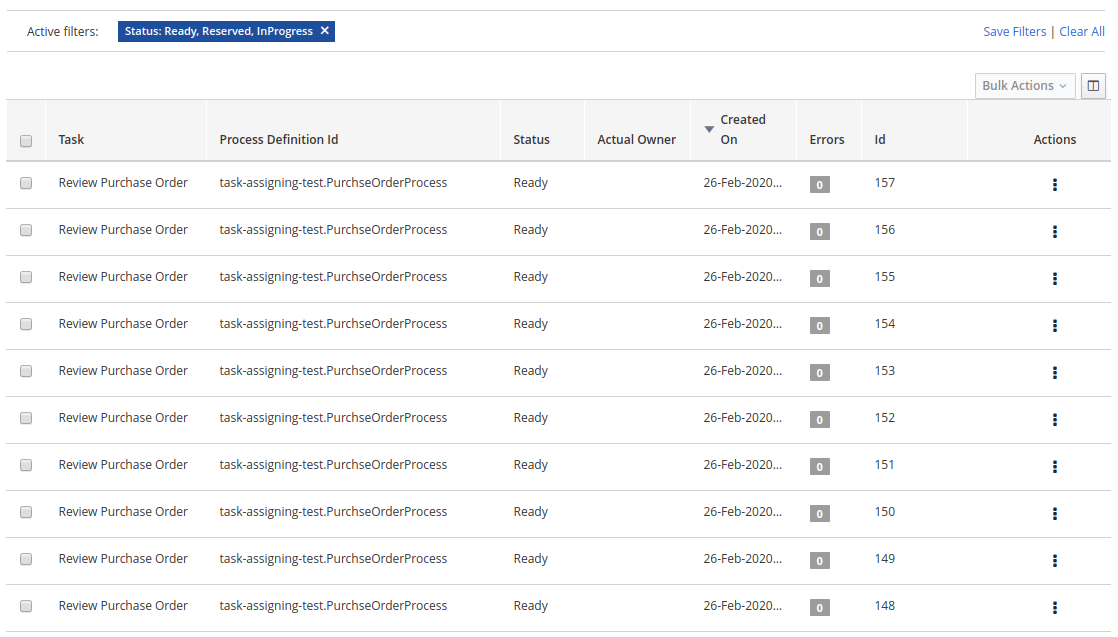
<img src="https://mintcdn.com/aletyx-3353d50c/Tvhapy25_Fkyd3v9/images/kie-server/KieServerTaskAssigning/BPMDefaultAssignment.png?fit=max&auto=format&n=Tvhapy25_Fkyd3v9&q=85&s=f50e6ac63a1727a305b87d7faf0a6f59" alt="BPMDefaultAssignment" width="1118" height="637" data-path="images/kie-server/KieServerTaskAssigning/BPMDefaultAssignment.png" />

*Default task list*

***OptaPlanner integrates with jBPM to provide the ability to assign human tasks to users as part of an optimized plan.*** {/* TODO: Review this */}

This is referred to as *task assigning integration*.

### BPM standard task assigning

In general, business process runtime engines assign human tasks to users on a group basis.
The target audience is usually included as part of the human task configuration.

The following image shows how the Review Purchase Order human task is configured with the PurchaseDepartment group:
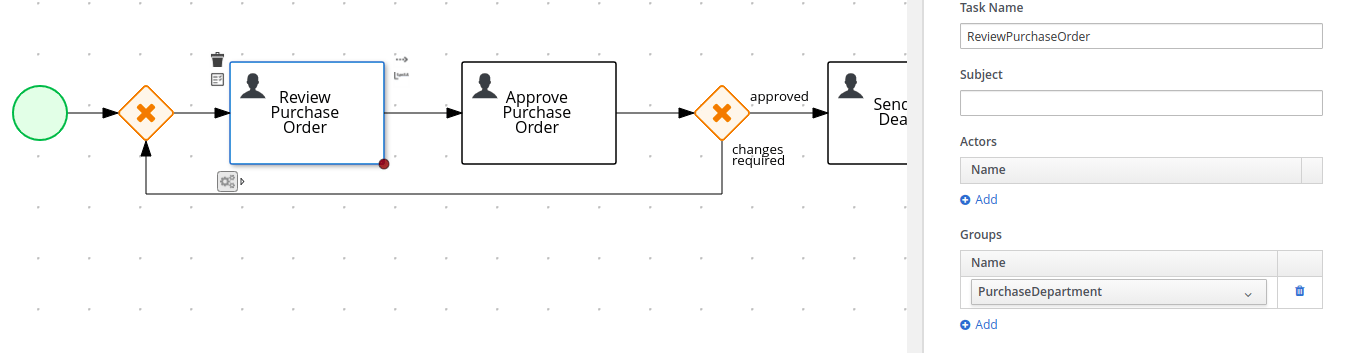
<img src="https://mintcdn.com/aletyx-3353d50c/Tvhapy25_Fkyd3v9/images/kie-server/KieServerTaskAssigning/ReviewPurchaseOrderTaskConfiguration.png?fit=max&auto=format&n=Tvhapy25_Fkyd3v9&q=85&s=4a0cda9dfc5e58eb04a95bf2011cae90" alt="ReviewPurchaseOrderTaskConfiguration" width="1356" height="353" data-path="images/kie-server/KieServerTaskAssigning/ReviewPurchaseOrderTaskConfiguration.png" />

*Human task configuration*

At runtime, every time a new instance of the Review Purchase Order task is created it is automatically assigned to the PurchaseDepartment group with the status Ready.
This makes the task automatically available to all users that belong to the group. All users in the group see it on their respective **Task Inbox** but none are the actual owner or responsible for the task. To be able to work with a particular task, a user must execute the claim operation to reserve the task for that user.

The following image shows an example of the claim operation execution for the task #152:

<img src="https://mintcdn.com/aletyx-3353d50c/Tvhapy25_Fkyd3v9/images/kie-server/KieServerTaskAssigning/UserClaimsTask.png?fit=max&auto=format&n=Tvhapy25_Fkyd3v9&q=85&s=2960024f99078e88bb33399f9a37898d" alt="UserClaimsTask" width="1445" height="167" data-path="images/kie-server/KieServerTaskAssigning/UserClaimsTask.png" />

*User claims a task*

When the claim operation is executed, the task status is changed to Reserved and the task is assigned to the claiming user.
In the preceding example, the claimer of the task is the `wbadmin` user. After the user claims the task, he is known as the task "actual owner".

<img src="https://mintcdn.com/aletyx-3353d50c/Tvhapy25_Fkyd3v9/images/kie-server/KieServerTaskAssigning/TaskClaimed.png?fit=max&auto=format&n=Tvhapy25_Fkyd3v9&q=85&s=59ae9eb11232c888d57cbffb4116259b" alt="TaskClaimed" width="1450" height="58" data-path="images/kie-server/KieServerTaskAssigning/TaskClaimed.png" />

*Task claimed by wbadmin*

Although this is the standard procedure for most BPMS products, it is not flexible enough for all use cases. For example, this procedure does not work well with scenarios where an optimal distribution of a huge set of tasks between users by given criteria is required.
In these cases, users usually find a large list of tasks up-front but do not have the knowledge to claim and execute them in the best way.

### OptaPlanner driven task assigning

OptaPlanner and jBPM integration provides the ability to assign the human tasks produced by the process runtime engine between users according to an optimized plan. {/* TODO: Review this */}
Instead of users having to claim the tasks, the tasks are assigned to them.

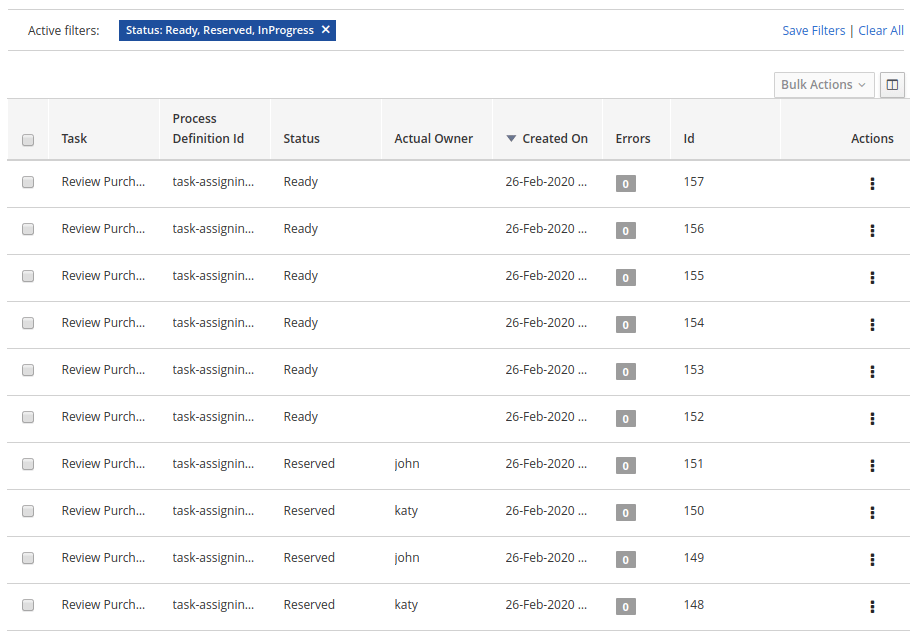
The following image shows how the tasks are assigned when integration is enabled.
<img src="https://mintcdn.com/aletyx-3353d50c/Tvhapy25_Fkyd3v9/images/kie-server/KieServerTaskAssigning/TasksAlreadyDistributed.png?fit=max&auto=format&n=Tvhapy25_Fkyd3v9&q=85&s=254ad9c28c04c8784e40211edced82e2" alt="TasksAlreadyDistributed" width="918" height="641" data-path="images/kie-server/KieServerTaskAssigning/TasksAlreadyDistributed.png" />

*Assignments produced by OptaPlanner* {/* TODO: Review this */}

The following assignments are shown:

* User katy is assigned to tasks #150 and #148
* User john is assigned to tasks #151 and #149
* Tasks #152, #153, #154, #155, #156 and #157 are left un-assigned (these tasks will be analysed later)

Behind the scenes the following actions took place:

1. All of the available tasks with the status "Ready" were consumed by OptaPlanner. {/* TODO: Review this */}
2. The users john and katy were identified as belonging to the "PurchaseDepartment" users group.
3. The "Review Purchase Order" tasks were identified as defined for the "PurchaseDepartment" group.
4. An optimized plan was calculated and all of the tasks (including the "un-assigned" tasks) were assigned according to their configuration, for example group condition and OptaPlanner optimization rules. The resulting plan stated that: {/* TODO: Review this */}
   * Tasks #150 and #148 must be assigned to katy
   * Tasks #151 and #149 must be assigned to john
5. OptaPlanner executed the correct process runtime actions to make these assignments happen. Note that the users were not required to execute the "claim" operation. Instead they can focus on completing their respective assigned work and leave the distribution and assignment work to OptaPlanner. {/* TODO: Review this */}

This simple example shows the main concept behind integration:

***"OptaPlanner analyses the available work, calculates an optimized plan, and produces the necessary assignments in the process runtime. Users then rely on that plan and focus on executing their assigned work".*** {/* TODO: Review this */}

**Unassigned tasks**

Usually, a running BPM creates many process instances and many human tasks.
At the same time, users are working and completing these human tasks.
This cycle is repeated over and over.

OptaPlanner addresses this situation by re-calculating the optimized plan when new human tasks are created and/or completed and producing "new assignments" to reflect the new optimized plan. {/* TODO: Review this */}
This is often achieved by combining different "Repeated Planning and Real Time Planning" techniques. For detailed information see the OptaPlanner documentation. {/* TODO: Review this */}

Additionally it might be the case that a plan that was optimal at time N is no longer optimal at time N+1.
For example, a higher priority task has arrived and must be performed as soon as possible.
The direct impact of this situation is that the programmed assignments at time N might change at time N+1, which means that tasks are routinely re-assigned many times when the new optimized plans are calculated. One of OptaPlanner’s strengths is the ability to react to a changing context. {/* TODO: Review this */}

**User impact**

If not controlled, continuous task re-assignment might negatively impact the user’s experience because they might feel that tasks come in and out of their workload randomly.
This situation is present in other types of optimization problems as well and is usually managed by combining different repeated and continuous planning techniques.
For detailed information see the "Repeated Planning" section of the OptaPlanner documentation. {/* TODO: Review this */}

A simple strategy is to introduce the concept of a planning window which is a defined subset of the available work that will not be changed or re-assigned even when new plans are calculated.
Only this subset is available to users. The tasks in the planning window are called published tasks.

The previous example contains a planning window with a size of two. This means that only two tasks from the optimized plan are assigned in the processes runtime for each user so that users have at most two tasks assigned to them and they must focus on those two tasks.
As soon as they start completing these tasks OptaPlanner assigns them additional tasks according to the last optimized plan. {/* TODO: Review this */}
However, internally OptaPlanner maintains information about the best assignments for all of the tasks and not only the published tasks. {/* TODO: Review this */}

This is how the assignments are distributed in the preceding example:

* User katy is assigned to tasks #150 and #148 which belong to the planning window
* User john is assigned to tasks #151 and #149 which belong to the planning window
* The un-assigned tasks are outside of the planning window which means they are assigned only internally by OptaPlanner. As long as these tasks remain unpublished they can be reassigned if necessary during the different optimized plans calculation. {/* TODO: Review this */}

## Configuring the integration

### Product version

The current task assigning integration implementation is provided for the OptaPlanner, jBPM, and KIE Server 7.38.x+ series. {/* TODO: Review this */}
<Note>
  KIE Server provides many installation alternatives, for example controller driven servers, standalone servers, high availability, etc.
  The purpose of this guide is to show you how to configure your KIE Server installation for the task assigning integration.
</Note>

For KIE Server and jBPM configuration information see their respective product documentation.

The following procedure is recommended:

1. Install the KIE Servers topology that you require.

2. If you are using the jBPM schema generation scripts be sure to execute the following sql script corresponding to the target database management system:

   jBPM installer → `/db/ddl-scripts/<dbms_vendor>/task_assigning_tables_<dbms_vendor>.sql`

   For example, in the case of a db2 database you must execute the following script:

   jBPM installer → `/db/ddl-scripts/db2/task_assigning_tables_db2.sql`

   For more information related to these scripts see jBPM documentation.

   Note: the reverse script in cases where the generated schema needs to be deleted can be found in the same location
   and has the following name: `task_assigning_tables_drop_<dbms_vendor>.sql`

3. Be sure the process runtime is executing well.

4. Install a dedicated [Planning kie-server](#planning-kie-server) (see next topics).

5. Complete the task assigning integration specific configuration parameters in all of the associated [Process Runtime kie-servers](#process-runtime-kie-server) and the [Planning kie-server](#planning-kie-server).

### Simplified architecture

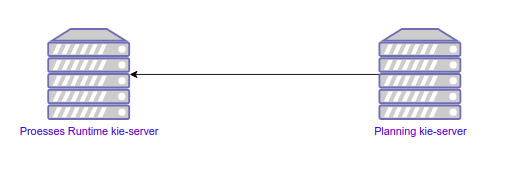
The following simplified architecture identifies the key components and configuration parameters for the task assigning integration.

<img src="https://mintcdn.com/aletyx-3353d50c/Tvhapy25_Fkyd3v9/images/kie-server/KieServerTaskAssigning/SimplifiedArchitecture.png?fit=max&auto=format&n=Tvhapy25_Fkyd3v9&q=85&s=6d2fa0ed73a99fa2296147b78b425dca" alt="SimplifiedArchitecture" width="507" height="179" data-path="images/kie-server/KieServerTaskAssigning/SimplifiedArchitecture.png" />

*Simplified architecture*

#### Process Runtime kie-server

This is the KIE Server instance where the business processes execute. In clustered and high-availability configurations, multiple instances can be used.

<Note>
  The task assigning integration can manage multiple process runtime KIE Servers as long as they share the same database where the process instances, human tasks instances, and so forth are stored and have the same set of deployed containers.
  In topologies where a KIE Server controller is configured this usually happens when they belong to the same KIE Server template.
  Be sure these statements are true before running the task assigning integration.
</Note>

#### Planning kie-server

This is the KIE Server instance where OptaPlanner will execute, for example where the optimized plans and so forth will be calculated, and where the [UserSystemService integration component](#usersystemservice-integration-component) will run. {/* TODO: Review this */}
The task assigning integration requires a single dedicated KIE Server instance for this purpose.
Be sure no other KIE Server extensions are enabled on this server.

### Configuration parameters setup

All of the configuration parameters that are defined in the next topics are defined through the Java system properties.
In Wildfly and Red Hat Enterprise Application Server (EAP) installations, these parameters are usually configured in the `<system-properties>` section of the selected configuration file, for example:

```xml theme={null}
<server xmlns="urn:jboss:domain:8.0">
...
    <system-properties>
        ...
        <property name="org.kie.server.taskAssigning.runtime.ext.disabled" value="false"/>
        ...
    </system-properties>
...
</server>
```

You can also use other methods of setting system properties, for example passing JVM parameters on the command line:

```java theme={null}
-Dorg.kie.server.taskAssigning.runtime.ext.disabled=false
```

<Note>
  It is recommended to use the same configuration method for all KIE Server required parameters.
</Note>

### Process Runtime kie-server configuration

The following table shows the only parameter that must be configured in all of the [Process Runtime kie-servers](#process-runtime-kie-server) in the target topology.

<table>
  <thead>
    <tr>
      <th>Parameter</th>
      <th>Requirement</th>
      <th>Description</th>
    </tr>
  </thead>

  <tbody>
    <tr>
      <td>org.kie.server.taskAssigning.runtime.ext.disabled</td>
      <td>Not required</td>

      <td>
        <p>The default value is "true", meaning that the task assigning integration is always disabled.</p>
        <p>Must be set to "false" for making it work.</p>
      </td>
    </tr>
  </tbody>
</table>

#### Process Runtime kie-server Wildfly/EAP configuration example

```xml theme={null}
<server>
...
    <system-properties>
       ...
        <property name="org.kie.server.taskAssigning.runtime.ext.disabled" value="false"/>
       ...
    </system-properties>
...
</server>
```

### Planning kie-server configuration

The following topics explain the parameters that you must configure in the [Planning kie-server](#planning-kie-server).
Whatever the target topology is, only one instance of this server will exist.

<Note>
  The parameters tagged as "Required" must be set only in cases where the task assigning integration is enabled. Some of them have a default value that automatically applies when not set.
</Note>

#### Global configuration parameters

<table>
  <thead>
    <tr>
      <th>Parameter</th>
      <th>Requirement</th>
      <th>Description</th>
    </tr>
  </thead>

  <tbody>
    <tr>
      <td>org.kie.server.taskAssigning.planning.ext.disabled</td>
      <td>Not required</td>

      <td>
        <p>The default value is "true", meaning that the task assigning integration is always disabled.</p>
        <p>Must be set to "false" for making it work.</p>
      </td>
    </tr>

    <tr>
      <td>org.kie.server.services.taskAssigning.core.model.planningUserId</td>
      <td>Required</td>

      <td>
        <p>The default value is "planninguser".</p>
        <p>This value configures the user for being assigned with the tasks that no other user in the system can be assigned to.</p>
        <p>For example, if a task has a required skill "astronaut" and no user can be found with this skill, it will be assigned to the planninguser.</p>
        <p>But it is not only restricted to skills, another example might be a task configured for a users group "Finance". If no user exists in that group it will be assigned to the planning user.</p>
        <p>It is strongly recommended that the planning user has the required human tasks administration grants in all of the target <a href="#process-runtime-kie-server">Process Runtime kie-servers</a>. By doing so it can easily proceed to track and eventually re-assign the tasks that couldn’t be managed by the tasks assigning integration.</p>
        <p>Note: it is recommended to keep this name.</p>
      </td>
    </tr>

    <tr>
      <td>org.kie.server.taskAssigning.processRuntime.url</td>
      <td>Required</td>

      <td>
        <p>The default value is [http://localhost:8080/kie-server/services/rest/server](http://localhost:8080/kie-server/services/rest/server)</p>
        <p>This value configures the URL for connecting to the <a href="#process-runtime-kie-server">Process Runtime kie-server</a> rest services.</p>
        <p>In a clustered environment a list of "|" separated urls can be used for doing load balancing between the different <a href="#process-runtime-kie-server">Process Runtime kie-servers</a>.</p>
      </td>
    </tr>

    <tr>
      <td>org.kie.server.taskAssigning.processRuntime.user</td>
      <td>Required</td>

      <td>
        <p>The default value is wbadmin</p>
        <p>This value configures the user id for connecting to the <a href="#process-runtime-kie-server">Process Runtime kie-server</a>. In a clustered environment it must exist in all of the configured target servers.</p>
        <p>The configured user must belong to the human tasks administration group. This group is usually found by looking at the target <a href="#process-runtime-kie-server">Process Runtime kie-server</a> configuration parameter:</p>
        <p>`<property name="org.jbpm.ht.admin.group" value="process-admin"/>`</p>
        <p>Following the example above the configured user must belong to the group "process-admin"</p>
      </td>
    </tr>

    <tr>
      <td>org.kie.server.taskAssigning.processRuntime.pwd</td>
      <td>Required</td>

      <td>
        <p>No default value is set.</p>
        <p>This value configures the password for the user configured in org.kie.server.taskAssigning.processRuntime.user parameter.</p>
      </td>
    </tr>

    <tr>
      <td>org.kie.server.taskAssigning.processRuntime.targetUser</td>
      <td>Required</td>

      <td>
        <p>No default value is set.</p>
        <p>This value configures the user ID used to execute the process runtime operations "on behalf of", and is usually the same as the value of the
        org.kie.server.taskAssigning.processRuntime.user parameter</p>
      </td>
    </tr>

    <tr>
      <td>org.kie.server.taskAssigning.processRuntime.key.alias</td>
      <td>Not Required</td>

      <td>
        <p>No default value is set.</p>
        <p>This parameter can be used in cases where it is required to get the runtime user password from the KIE Server keystore and represents the alias for locating it.</p>
      </td>
    </tr>

    <tr>
      <td>org.kie.server.taskAssigning.processRuntime.key.pwd</td>
      <td>Not Required</td>

      <td>
        <p>No default value is set.</p>
        <p>This parameter must be used in cases where the runtime user password is stored in the KIE Server keystore, and represents the password for accessing the corresponding keystore entry.</p>
      </td>
    </tr>

    <tr>
      <td>kie.keystore.keyStoreURL</td>
      <td>Not Required</td>

      <td>
        <p>No default value is set.</p>
        <p>URL for the JCEKS that you want to use, for example file:///home/kie/keystores/keystore.jceks</p>
      </td>
    </tr>

    <tr>
      <td>kie.keystore.keyStorePwd</td>
      <td>Not Required</td>

      <td>
        <p>No default value is set.</p>
        <p>Password for the JCEKS</p>
      </td>
    </tr>

    <tr>
      <td>org.kie.server.taskAssigning.processRuntime.timeout</td>
      <td>Not Required</td>

      <td>
        <p>The default value is 90000.</p>
        <p>This value configures the timeout in milliseconds for the operation invocations on the <a href="#process-runtime-kie-server">Process runtime kie-server</a>.</p>
      </td>
    </tr>

    <tr>
      <td>org.kie.server.taskAssigning.runtimeDelegate.pageSize</td>
      <td>Not Required</td>

      <td>
        <p>The default value is 3000.</p>
        <p>This value configures the page size for the paged queries. The default value is good for most scenarios and it’s not recommended to be modified unless specific fine tunings are required.</p>
      </td>
    </tr>

    <tr>
      <td>org.kie.server.taskAssigning.solutionSyncInterval</td>
      <td>Required</td>

      <td>
        <p>The default value is "PT2S" (two seconds).</p>
        <p>This value configures the time interval for the tasks information refreshing from the <a href="#process-runtime-kie-server">Process Runtime kie-server</a>.</p>
        <p>The accepted format is based on the ISO-8601 duration format PnDTnHnMn.nS with days considered to be exactly 24 hours.
        For example:</p>
        <p>"PT1.500S":  configures 1500 milliseconds.</p>
        <p>"PT0.500S":  configures 500 milliseconds.</p>
        <p>"PT3S":      configures 3000 milliseconds.</p>
      </td>
    </tr>

    <tr>
      <td>org.kie.server.taskAssigning.solutionSyncQueriesShift</td>
      <td>Required</td>

      <td>
        <p>The default value is "PT10M"</p>
        <p>This value configures a timeshift for adjusting the tasks information refreshing queries. In most cases it should never be modified and should not be less than PT5M (five minutes).</p>
        <p>The accepted format is based on the ISO-8601 duration format PnDTnHnMn.nS with days considered to be exactly 24 hours.</p>
      </td>
    </tr>

    <tr>
      <td>org.kie.server.taskAssigning.publishWindowSize</td>
      <td>Required</td>

      <td>
        <p>The default value is 2.</p>
        <p>This value configures the maximum amount of tasks per user that will be assigned to it in the <a href="#process-runtime-kie-server">Process Runtime kie-server</a> when an optimized plan is calculated. See "published tasks"</p>
        <p>This value should usually be low, 2, 3, or 4, since it is expected that the tasks will be assigned to the users according to an optimized plan that is changing over time. High values might lead to the <a href="#bpm-standard-task-assigning">BPM Standard task assigning</a> which could make the tasks assigning integration senseless.</p>
      </td>
    </tr>

    <tr>
      <td>org.kie.server.taskAssigning.usersSyncInterval</td>
      <td>Required</td>

      <td>
        <p>The default value is "PT2H" (two hours)</p>
        <p>This value configures the time interval for the user’s information refreshing from the <a href="#usersystemservice-integration-component">UserSystemService integration component</a>.</p>
        <p>The accepted format is based on the ISO-8601 duration format PnDTnHnMn.nS with days considered to be exactly 24 hours.</p>
      </td>
    </tr>

    <tr>
      <td>org.kie.server.taskAssigning.waitForImprovedSolutionDuration</td>
      <td>Not Required</td>

      <td>
        <p>The default value is "PT0S" (no wait)</p>
        <p>This value configures the time interval to improve a solution before the corresponding optimized plan is sent to the <a href="#process-runtime-kie-server">Process Runtime kie-server</a>.</p>
        <p>Because this wait time is applied every time a new set of changes is processed it should usually be short, for example "PT0.500" (500 milliseconds). Use it in cases when early improvements are desired.</p>
        <p>The accepted format is based on the ISO-8601 duration format PnDTnHnMn.nS with days considered to be exactly 24 hours.</p>
      </td>
    </tr>

    <tr>
      <td>org.kie.server.taskAssigning.improveSolutionOnBackgroundDuration</td>
      <td>Not Required</td>

      <td>
        <p>The default value is "PT1M" (one minute)</p>
        <p>This value configures the time interval for doing a background optimization of the current solution after the corresponding optimized plan is sent to the <a href="#process-runtime-kie-server">Process Runtime kie-server</a>.</p>
        <p>In situations where no changes in the processes are produced and a better solution is calculated during that period, the new optimized plan is automatically sent to the <a href="#process-runtime-kie-server">Process Runtime kie-server</a>.</p>
        <p>The accepted format is based on the ISO-8601 duration format PnDTnHnMn.nS with days considered to be exactly 24 hours.</p>
      </td>
    </tr>
  </tbody>
</table>

#### Solver configuration parameters

As mentioned, the task assigning integration delegates the calculation of "which tasks must be assigned to whom" to OptaPlanner, which resolves this requirement by producing an optimized plan. {/* TODO: Review this */}
This plan is calculated by using a Solver with a set of configured constraints. See OptaPlanner product documentation for more information. {/* TODO: Review this */}

Two mechanisms are available for configuring OptaPlanner’s Solver specifics. {/* TODO: Review this */}

Note: The parameter tagged as "Required" must have a value independently of the selected Solver configuration mechanism.

#### Class path based solver configuration

This mechanism implements the ability of configuring the Solver by using a class path resource.

<table>
  <thead>
    <tr>
      <th>Parameter</th>
      <th>Requirement</th>
      <th>Description</th>
    </tr>
  </thead>

  <tbody>
    <tr>
      <td>org.kie.server.taskAssigning.solver.configResource</td>
      <td>Required</td>

      <td>
        <p>The default value is:
        "org/kie/server/services/taskassigning/solver/taskAssigningDefaultSolverConfig.xml"</p>
        <p>This value configures the path to a class-path resource with the Solver configuration.</p>
        <p>If the resource can’t be found or the configuration is wrong, a controlled error will be added to the <a href="#planning-kie-server">Planning kie-server</a> error messages and the task assigning integration won’t be initialized. The KIE Server APIs can be used for querying these error messages and checking the status.</p>
      </td>
    </tr>

    <tr>
      <td>org.kie.server.taskAssigning.solver.moveThreadCount</td>
      <td>Not Required</td>

      <td>
        <p>The default value is AUTO.</p>
        <p>This value configures the solver’s ability of using multithreaded incremental solving.</p>
        <p>For more information see OptaPlanner documentation.</p>
        <p>Note: when the container based solver configuration is used this value is not considered, the configuration provided in the KJAR is used instead.</p>
      </td>
    </tr>

    <tr>
      <td>org.kie.server.taskAssigning.solver.moveThreadBufferSize</td>
      <td>Not Required</td>

      <td>
        <p>No default value is set.</p>
        <p>This value power tweaks the number of moves that are selected but won’t be foraged when multithreaded incremental solving is used.
        Setting it too low reduces performance, but setting it too high too. Unless you’re deeply familiar with the inner workings of multithreaded solving, don’t configure this parameter.</p>
        <p>For more information see OptaPlanner documentation.</p>
        <p>Note: when the container based solver configuration is used this value is not considered, the configuration provided in the KJAR is used instead.</p>
      </td>
    </tr>

    <tr>
      <td>org.kie.server.taskAssigning.solver.threadFactoryClass</td>
      <td>Not Required</td>

      <td>
        <p>No default value is set.</p>
        <p>The threadFactoryClass allows you to plug in a custom ThreadFactory for environments where arbitrary thread creation should be avoided.</p>
        <p>For more information see OptaPlanner documentation.</p>
        <p>Note: when the container based solver configuration is used this value is not considered, the configuration provided in the KJAR is used instead.</p>
      </td>
    </tr>
  </tbody>
</table>

<Note>
  The default solver configuration includes a set of constraints for implementing optimized task assigning, therefore it is not necessary to provide a different set of constraints in most cases.
  Use cases that require specific tunings, for example related to business data, can use this alternative. However it is recommended to use a Container based configuration for these purposes.
</Note>

#### Container based solver configuration

This mechanism implements the ability to configure the Solver by using a container.
Finally, given that the KIE Server architecture is based on containers, this is usually the recommended approach.
However, in many of the use cases the default configuration is good enough and no container configuration is necessary, see [Default Constraints](#default-constraints).

The following table shows the container-based configuration parameters:

<table>
  <thead>
    <tr>
      <th>Parameter</th>
      <th>Requirement</th>
      <th>Description</th>
    </tr>
  </thead>

  <tbody>
    <tr>
      <td>org.kie.server.taskAssigning.solver.container.id</td>
      <td>Not Required</td>

      <td>
        <p>No default value is set.</p>
        <p>This value configures the Identifier of the container to use.</p>
        <p>When set the container based configuration will be activated and the following container related parameters are required.</p>
      </td>
    </tr>

    <tr>
      <td>org.kie.server.taskAssigning.solver.container.groupId</td>
      <td>Required if the container configuration is activated</td>

      <td>
        <p>No default value is set.</p>
        <p>This value configures the Maven groupId of the artifact to use for creating the container when needed.</p>
      </td>
    </tr>

    <tr>
      <td>org.kie.server.taskAssigning.solver.container.artifactId</td>
      <td>Required if the container configuration is activated</td>

      <td>
        <p>No default value is set.</p>
        <p>This value configures the Maven artifactId for the artifact to use for creating the container when needed.</p>
      </td>
    </tr>

    <tr>
      <td>org.kie.server.taskAssigning.solver.container.version</td>
      <td>Required if the container configuration is activated</td>

      <td>
        <p>No default value is set.</p>
        <p>This value configures the Maven version for the artifact to use for creating the container when needed.</p>
      </td>
    </tr>

    <tr>
      <td>org.kie.server.taskAssigning.solver.configResource</td>
      <td>Required if the container configuration is activated</td>

      <td>
        <p>This value configures the path to the resource with the Solver configuration in the container class-path.</p>
      </td>
    </tr>
  </tbody>
</table>

In case of errors, analogous to the "Class path based solver configuration" proper KIE Server error messages will be generated and the task assigning integration won’t be initialized.
The KIE Server APIs can be used for querying these error messages and checking the status.

#### UserSystemService integration component

Calculating an optimized plan for assigning tasks to users often requires considering business related information.
Common examples, included in the current task assigning integration version, are the usage of the groups, the skills that a given user has, or the affinities in certain topics, etc. See [Skills and Affinities](#skills-and-affinities).
This business oriented information must be provided by each particular installation and is delegated to the UserSystemService integration component.
It is up to the tasks assigning integrator to provide this component.

UserSystemService API

A user system service component must implement the following API.

```java theme={null}
public interface UserSystemService {

    /**
     * Invoked by the task assigning integration as part of the initialization procedure and
     * before any other method is invoked.
     */
    void start();

    /**
     * Invoked by the task assigning integration as part of the initialization procedure and
     * after the start() method is invoked.
     * @throws Exception if the test method failed.
     */
    void test() throws Exception;

    /**
     * @return the name of the UserSystemService implementation.
     */
    String getName();

    /**
     * @return the list of all users present in the external user system. This method is normally
     * invoked each time the solver is initialized or when the users information is updated from
     * the external user system.
     */
    List<User> findAllUsers();

    /**
     * Get the user information for a particular user.
     * @param id user identifier for querying.
     * @return the User corresponding to the given identifier, null if no user was found.
     */
    User findUser(String id);
}
```

#### UserSystemService configuration

Analogous to the Solver configuration, two mechanisms are available for configuring the UserSystemService and in both cases the standard Java SPI (Service Provider Interface) and ServiceLoader mechanisms are used for its instantiation.

#### Class path based UserSystemService configuration

Use the following resource for configuring the different UserSystemService provider implementations:

META-INF/services/org.kie.server.services.taskassigning.user.system.api.UserSystemService

And finally add the following configuration parameters for configuring the selected implementation:

<table>
  <thead>
    <tr>
      <th>Parameter</th>
      <th>Requirement</th>
      <th>Description</th>
    </tr>
  </thead>

  <tbody>
    <tr>
      <td>org.kie.server.taskAssigning.userSystem.name</td>
      <td>Required</td>

      <td>
        <p>No default value is set.</p>
        <p>This value configures the name of the UserSystemService provider instance to use.</p>
        <p>See: UserSystemService.getName()</p>
        <p>All of the configured providers are loaded from the application class-path and the one that matches with the configured name will be used.</p>
        <p>A simple user system service implementation is provided, see <a href="#simpleusersystemservice">SimpleUserSystemService</a>.</p>
      </td>
    </tr>
  </tbody>
</table>

#### Container based UserSystemService configuration

Use the following resource in your Kie Module (KJAR) to configure the different UserSystemService provider implementations:

project\_home/src/main/resources/META-INF/services/org.kie.server.services.taskassigning.user.system.api.UserSystemService

And finally add the following configuration parameters for configuring the selected implementation:

<table>
  <thead>
    <tr>
      <th>Parameter</th>
      <th>Requirement</th>
      <th>Description</th>
    </tr>
  </thead>

  <tbody>
    <tr>
      <td>org.kie.server.taskAssigning.userSystem.name</td>
      <td>Required</td>

      <td>
        <p>No default value is set.</p>
        <p>This value configures the name of the UserSystemService provider instance to use.</p>
        <p>See: UserSystemService.getName()</p>
      </td>
    </tr>

    <tr>
      <td>org.kie.server.taskAssigning.userSystem.container.id</td>
      <td>Not Required</td>

      <td>
        <p>No default value is set.</p>
        <p>This value configures the Identifier of the container to use.</p>
        <p>When set the container based configuration will be activated and all of the potential UserSystemService providers that might be defined in the container class-path will be considered for selection, additionally to the ones in the application class-path.</p>
        <p>The following parameters will be required.</p>
      </td>
    </tr>

    <tr>
      <td>org.kie.server.taskAssigning.userSystem.container.groupId</td>
      <td>Required if the container configuration is activated.</td>

      <td>
        <p>No default value is set.</p>
        <p>This value configures the Maven groupId of the artifact to use for creating the container when needed.</p>
      </td>
    </tr>

    <tr>
      <td>org.kie.server.taskAssigning.userSystem.container.artifactId</td>
      <td>Required if the container configuration is activated.</td>

      <td>
        <p>No default value is set.</p>
        <p>This value configures the Maven artifactId for the artifact to use for creating the container when needed.</p>
      </td>
    </tr>

    <tr>
      <td>org.kie.server.taskAssigning.userSystem.container.version</td>
      <td>Required if the container configuration is activated.</td>

      <td>
        <p>No default value is set.</p>
        <p>This value configures the Maven version for the artifact to use for creating the container when needed.</p>
      </td>
    </tr>
  </tbody>
</table>

In case of errors, for example if the configured provider name was not found, the container couldn’t be instantiated, etc., a controlled error will be added to the [Planning kie-server](#planning-kie-server) error messages and the task assigning integration won’t be initialized.
The KIE Server APIs can be used for querying these error messages and checking the status.

#### SimpleUserSystemService

The SimpleUserSystemService is a basic UserSystemService implementation that loads the user definitions, skills and affinities from a Java properties file in the format used by the Wildfly/EAP application servers.
This implementation is always present in the [Planning kie-server](#planning-kie-server) and is intended mainly for development and testing purposes.

The following example shows a user definitions file:

```java theme={null}
katy=analyst,HR
john=IT,Developer
```

In this example, two users are defined:

* User katy that belongs to the groups analyst and HR
* User john that belongs to the groups IT and Developer

The following parameters can be used to configure it:

<table>
  <thead>
    <tr>
      <th>Parameter</th>
      <th>Requirement</th>
      <th>Description</th>
    </tr>
  </thead>

  <tbody>
    <tr>
      <td>org.kie.server.taskAssigning.userSystem.name</td>
      <td>Required</td>

      <td>
        <p>Must be the value SimpleUserSystemService</p>
      </td>
    </tr>

    <tr>
      <td>org.kie.server.services.taskassigning.user.system.simple.users</td>
      <td>Required</td>

      <td>
        <p>This value configures a <a href="#planning-kie-server">Planning kie-server</a> web application accessible path with the user definitions file.</p>
        <p>For example, in Wildfly/EAP installations it can be like this.</p>
        <p>`${jboss.server.config.dir}/roles.properties`</p>
        <p>Note: the configured file must have the same values as the roles.properties files of the <a href="#process-runtime-kie-server">Process Runtime kie-servers</a> in the target topology.</p>
      </td>
    </tr>

    <tr>
      <td>org.kie.server.services.taskassigning.user.system.simple.skills</td>
      <td>Not Required</td>

      <td>
        <p>This value configures a <a href="#planning-kie-server">Planning kie-server</a> web application accessible path with the users skills definitions if desired, see <a href="#skills-and-affinities">Skills and Affinities</a>.</p>
        <p>For example, in Wildfly/EAP installations it can be like this.</p>
        <p>`${jboss.server.config.dir}/skills.properties`</p>
        <p>Note: the format is analogous to the user definitions file.</p>
        <p>katy=skill1,skill2<br />john=skill1,skill2</p>
      </td>
    </tr>

    <tr>
      <td>org.kie.server.services.taskassigning.user.system.simple.affinities</td>
      <td>Not Required</td>

      <td>
        <p>This value configures a <a href="#planning-kie-server">Planning kie-server</a> web application accessible path with the users affinities definition if desired, <a href="#skills-and-affinities">Skills and Affinities</a>.</p>
        <p>For example, in Wildfly/EAP installations it can be like this.</p>
        <p>`${jboss.server.config.dir}/affinities.properties`</p>
        <p>Note: the format is analogous to the user definitions file.</p>
        <p>katy=affinity1,affinity4<br />In this example john has no affinities.</p>
      </td>
    </tr>
  </tbody>
</table>

#### Planning kie-server Wildfly/EAP configuration example

Below is an extract of the task assigning configuration parameters for a Wildfly/EAP server.

```xml theme={null}
<server>
...
<system-properties>
...
  <!-- the following kie-server extensions must be disabled in the Planning kie-server -->
  <property name="org.jbpm.server.ext.disabled" value="true"/>
  <property name="org.jbpm.ui.server.ext.disabled" value="true"/>
  <property name="org.jbpm.case.server.ext.disabled" value="true"/>
  <property name="org.kie.dmn.server.ext.disabled" value="true"/>
  <property name="org.kie.swagger.server.ext.disabled" value="true"/>

  <!-- enable the TaskAssigningPlanningKieServerExtension -->
  <property name="org.kie.server.taskAssigning.planning.ext.disabled" value="false"/>

  <property name="org.kie.server.taskAssigning.processRuntime.url"
            value="http://localhost:8080/kie-server/services/rest/server"/>
  <property name="org.kie.server.taskAssigning.processRuntime.user" value="wbadmin"/>
  <property name="org.kie.server.taskAssigning.processRuntime.pwd" value="wbadmin"/>
  <property name="org.kie.server.taskAssigning.processRuntime.targetUser" value="wbadmin"/>
  <property name="org.kie.server.taskAssigning.solutionSyncInterval" value="PT2S"/>

  <!-- example of a Solver configuration based on a user provided kjar -->
  <!--
  <property name="org.kie.server.taskAssigning.solver.configResource" value="org/kie/server/services/taskassigning/solver/taskAssigningDefaultSolverConfig.xml"/>
  <property name="org.kie.server.taskAssigning.solver.container.id"
            value="kie-server-task-assigning-default-planner-kjar-container"/>
  <property name="org.kie.server.taskAssigning.solver.container.groupId" value="org.kie.server"/>
  <property name="org.kie.server.taskAssigning.solver.container.artifactId"
            value="kie-server-task-assigning-default-planner-kjar"/>
  <property name="org.kie.server.taskAssigning.solver.container.version" value="X.XX.XXX"/>
  -->

  <!-- default SimpleUserSystemService configuration -->
  <property name="org.kie.server.taskAssigning.userSystem.name" value="SimpleUserSystemService"/>
  <property name="org.kie.server.services.taskassigning.user.system.simple.users"
            value="${jboss.server.config.dir}/roles.properties"/>

  <!-- un-comment and configure if skills information will be loaded -->
  <!--
  <property name="org.kie.server.services.taskassigning.user.system.simple.skills"
            value="${jboss.server.config.dir}/skills.properties"/>
  -->

  <!-- un-comment and configure if affinities information will be loaded -->
  <!--
  <property name="org.kie.server.services.taskassigning.user.system.simple.affinities"
            value="${jboss.server.config.dir}/affinities.properties"/>
  -->
  <!-- end of default SimpleUserSystemService configuration -->

  <!-- example of a UserSystemService configuration based on a user provided kjar -->
  <!--
  <property name="org.kie.server.taskAssigning.userSystem.name"
            value="SimpleUserSystemServiceByKjar"/>
  <property name="org.kie.server.taskAssigning.userSystem.container.id"
            value="task-assigning-user-system-service-simple-by-kjar-container"/>
  <property name="org.kie.server.taskAssigning.userSystem.container.groupId"
            value="org.kie.server"/>
  <property name="org.kie.server.taskAssigning.userSystem.container.artifactId"
            value="kie-server-task-assigning-user-system-simple-kjar"/>
  <property name="org.kie.server.taskAssigning.userSystem.container.version" value="X.XX.XXX"/>
  -->
...
</system-properties>
...
</server>
```

#### Spring Boot configuration

When the KIE Server Spring Boot Starter version is used the following configuration parameters are used to configure the task assigning integration.
These parameters are usually configured in the corresponding Spring Boot application.properties file. The same statements as for standard KIE Server topologies apply in this case.

| Parameter                                         | Requirement                                          | Description                                                                                                                                                                                                                  |
| ------------------------------------------------- | ---------------------------------------------------- | ---------------------------------------------------------------------------------------------------------------------------------------------------------------------------------------------------------------------------- |
| kieserver.taskAssigning.runtime.enabled           | Required                                             | Must be set to "true" in order to enable the task assigning integration in the [Process Runtime kie-server](#process-runtime-kie-server)                                                                                     |
| kieserver.taskAssigning.planning.enabled          | Required                                             | Must be set to "true" in order to enable the task assigning integration in the [Planning kie-server](#planning-kie-server)                                                                                                   |
| taskassigning.core.model.planningUserId           | Required                                             | This value is analogous to the org.kie.server.services.taskAssigning.core.model.planningUserId configuration parameter, see [Global configuration parameters](#global-configuration-parameters)                              |
| taskassigning.processRuntime.url                  | Required                                             | This value is analogous to the org.kie.server.taskAssigning.processRuntime.url configuration parameter, see [Global configuration parameters](#global-configuration-parameters)                                              |
| taskassigning.processRuntime.user                 | Required                                             | This value is analogous to the org.kie.server.taskAssigning.processRuntime.user configuration parameter, see [Global configuration parameters](#global-configuration-parameters)                                             |
| taskassigning.processRuntime.pwd                  | Required                                             | This value is analogous to the org.kie.server.taskAssigning.processRuntime.pwd configuration parameter, see [Global configuration parameters](#global-configuration-parameters)                                              |
| taskassigning.processRuntime.targetUser           | Required                                             | This value is analogous to the org.kie.server.taskAssigning.processRuntime.targetUser configuration parameter, see [Global configuration parameters](#global-configuration-parameters)                                       |
| taskassigning.processRuntime.key.alias            | Not Required                                         | This value is analogous to the org.kie.server.taskAssigning.processRuntime.key.alias configuration parameter, see [Global configuration parameters](#global-configuration-parameters)                                        |
| taskassigning.processRuntime.key.pwd              | Not Required                                         | This value is analogous to the org.kie.server.taskAssigning.processRuntime.key.pwd configuration parameter, see [Global configuration parameters](#global-configuration-parameters)                                          |
| taskassigning.processRuntime.timeout              | Not Required                                         | This value is analogous to the  org.kie.server.taskAssigning.processRuntime.timeout configuration parameter, see [Global configuration parameters](#global-configuration-parameters)                                         |
| taskassigning.runtimeDelegate.pageSize            | Not Required                                         | This value is analogous to the  org.kie.server.taskAssigning.runtimeDelegate.pageSize configuration parameter, see [Global configuration parameters](#global-configuration-parameters)                                       |
| taskassigning.solutionSyncInterval                | Required                                             | This value is analogous to the org.kie.server.taskAssigning.solutionSyncInterval configuration parameter, see [Global configuration parameters](#global-configuration-parameters)                                            |
| taskassigning.solutionSyncQueriesShift            | Required                                             | This value is analogous to the org.kie.server.taskAssigning.solutionSyncQueriesShift configuration parameter, see [Global configuration parameters](#global-configuration-parameters)                                        |
| taskassigning.publishWindowSize                   | Required                                             | This value is analogous to the org.kie.server.taskAssigning.publishWindowSize configuration parameter, see [Global configuration parameters](#global-configuration-parameters)                                               |
| taskassigning.usersSyncInterval                   | Required                                             | This value is analogous to the org.kie.server.taskAssigning.usersSyncInterval configuration parameter, see [Global configuration parameters](#global-configuration-parameters)                                               |
| taskassigning.waitForImprovedSolutionDuration     | Not Required                                         | This value is analogous to the org.kie.server.taskAssigning.waitForImprovedSolutionDuration configuration parameter, see [Global configuration parameters](#global-configuration-parameters)                                 |
| taskassigning.improveSolutionOnBackgroundDuration | Not Required                                         | This value is analogous to the org.kie.server.taskAssigning.improveSolutionOnBackgroundDuration configuration parameter, see [Global configuration parameters](#global-configuration-parameters)                             |
| taskassigning.solver.configResource               | Required                                             | This value is analogous to the org.kie.server.taskAssigning.solver.configResource configuration parameter, see [Solver configuration parameters](#solver-configuration-parameters)                                           |
| taskassigning.solver.moveThreadCount              | Not Required                                         | This value is analogous to the org.kie.server.taskAssigning.solver.moveThreadCount configuration parameter, see [Solver configuration parameters](#solver-configuration-parameters)                                          |
| taskassigning.solver.moveThreadBufferSize         | Not Required                                         | This value is analogous to the org.kie.server.taskAssigning.solver.moveThreadBufferSize configuration parameter, see [Solver configuration parameters](#solver-configuration-parameters)                                     |
| taskassigning.solver.threadFactoryClass           | Not Required                                         | This value is analogous to the org.kie.server.taskAssigning.solver.threadFactoryClass configuration parameter, see [Solver configuration parameters](#solver-configuration-parameters)                                       |
| taskassigning.solver.container.id                 | Not Required                                         | This value is analogous to the org.kie.server.taskAssigning.solver.container.id configuration parameter, see [Container based solver configuration](#container-based-solver-configuration)                                   |
| taskassigning.solver.container.groupId            | Required if the container configuration is activated | This value is analogous to the org.kie.server.taskAssigning.solver.container.groupId configuration parameter, see [Container based solver configuration](#container-based-solver-configuration)                              |
| taskassigning.solver.container.artifactId         | Required if the container configuration is activated | This value is analogous to the org.kie.server.taskAssigning.solver.container.artifactId configuration parameter, see [Container based solver configuration](#container-based-solver-configuration)                           |
| taskassigning.solver.container.version            | Required if the container configuration is activated | This value is analogous to the org.kie.server.taskAssigning.solver.container.version configuration parameter, see [Container based solver configuration](#container-based-solver-configuration)                              |
| taskassigning.solver.configResource               | Required if the container configuration is activated | This value is analogous to the org.kie.server.taskAssigning.solver.configResource configuration parameter, see [Container based solver configuration](#container-based-solver-configuration)                                 |
| taskassigning.userSystem.name                     | Required                                             | This value is analogous to the org.kie.server.taskAssigning.userSystem.name configuration parameter, see [UserSystemService configuration](#usersystemservice-configuration)                                                 |
| taskassigning.userSystem.container.id             | Not Required                                         | This value is analogous to the org.kie.server.taskAssigning.userSystem.container.id configuration parameter, see [Container based UserSystemService configuration](#container-based-usersystemservice-configuration)         |
| taskassigning.userSystem.container.groupId        | Required if the container configuration is activated | This value is analogous to the org.kie.server.taskAssigning.userSystem.container.groupId configuration parameter, see [Container based UserSystemService configuration](#container-based-usersystemservice-configuration)    |
| taskassigning.userSystem.container.artifactId     | Required if the container configuration is activated | This value is analogous to the org.kie.server.taskAssigning.userSystem.container.artifactId configuration parameter, see [Container based UserSystemService configuration](#container-based-usersystemservice-configuration) |
| taskassigning.userSystem.container.version        | Required if the container configuration is activated | This value is analogous to the org.kie.server.taskAssigning.userSystem.container.version configuration parameter, see [Container based UserSystemService configuration](#container-based-usersystemservice-configuration)    |
| tastaskassigning.userSystem.simple.users          | Required if the Simple User System is configured     | This value is analogous to the org.kie.server.services.taskassigning.user.system.simple.users configuration parameter, see [SimpleUserSystemService](#simpleusersystemservice)                                               |
| taskassigning.userSystem.simple.skills            | Not Required                                         | This value is analogous to the org.kie.server.services.taskassigning.user.system.simple.skills configuration parameter, see [SimpleUserSystemService](#simpleusersystemservice)                                              |
| taskassigning.userSystem.simple.affinities        | Not Required                                         | This value is analogous to the  org.kie.server.services.taskassigning.user.system.simple.affinities configuration parameter, see [SimpleUserSystemService](#simpleusersystemservice)                                         |

#### Default Constraints

The following table gives a high level description of the set of constraints that are included in the task assigning integration.
These constraints are used for the construction of the optimized plan, in other words "for determining which tasks should be assigned to whom".

In general a large set of use cases can be covered by using them and no extensions are required, but it is possible to work with a user-provided customized set of constraints if needed, see [Container based solver configuration](#container-based-solver-configuration).

Optimized solutions construction is made by using a BendableLongScore with two levels of Hard constraints and six levels of Soft constraints. These constraint levels can be customized by following a set of restrictions.

<table>
  <thead>
    <tr>
      <th>Constraint</th>
      <th>Level/Requirement</th>
      <th>Description</th>
    </tr>
  </thead>

  <tbody>
    <tr>
      <td>Required Potential Owner</td>
      <td>Hard Constraint 0 (required)</td>

      <td>
        <p>Determines that a task must be assigned to one of its "Potential Owners", or to the "Planning User" in cases where no "Potential Owners" are found.</p>
        <p>User provided customizations must always include this constraint as the first level hard constraint.
        Otherwise the business process semantics won’t be considered by the task assigning integration, i.e., tasks might be assigned to users that are not "Potential Owners" for it.</p>
        <p>In cases where this constraint is still customized, it must always consider assigning the "Planning User" when no other user fits the customized condition.</p>
      </td>
    </tr>

    <tr>
      <td>Required Skills</td>
      <td>Hard Constraint 1</td>

      <td>
        <p>Determines that a task can only be assigned to a user that has all of the task’s configured skills, see <a href="#skills-and-affinities">Skills and Affinities</a>.</p>
        <p>If a task has configured skills but no user with all of these skills can be found it’ll be assigned to the "Planning User".</p>
        <p>If the task doesn’t have configured skills the constraint has no effect.</p>
        <p>In cases where this constraint is customized, it must always consider assigning the "Planning User" when no other user fits the customized condition.</p>
      </td>
    </tr>

    <tr>
      <td>PlanningUser assignment</td>
      <td>Soft Constraint 0 (required)</td>

      <td>
        <p>Penalizes the "Planning User" assignment. This constraint enforces the minimization of the "Planning User" assignment and ensures it’ll be assigned as the "last available option".</p>
        <p>Do not customize or change this constraint.</p>
      </td>
    </tr>

    <tr>
      <td>High level priority</td>
      <td>Soft Constraint 1</td>

      <td>
        <p>Enforces the assignment of higher priority tasks first whenever it is possible.</p>
      </td>
    </tr>

    <tr>
      <td>Desired Affinities</td>
      <td>Soft Constraint 2</td>

      <td>
        <p>Makes a best effort for assigning tasks according to its configured affinities, see <a href="#skills-and-affinities">Skills and Affinities</a></p>
        <p>If a task has configured affinities, whenever it is possible, a user with the most of them will be picked for its assignment.</p>
        <p>If the task doesn’t have configured affinities the constraint has no effect.</p>
      </td>
    </tr>

    <tr>
      <td>Minimize makespan</td>
      <td>Soft Constraint 3 (required)</td>

      <td>
        <p>Reduce the time to complete all tasks.</p>
        <p>This constraint must always be included.</p>
      </td>
    </tr>

    <tr>
      <td>Medium level priority</td>
      <td>Soft Constraint 4</td>

      <td>
        <p>Medium level priority tasks are assigned after higher priority tasks whenever it is possible.</p>
      </td>
    </tr>

    <tr>
      <td>Low level priority</td>
      <td>Soft Constraint 5</td>

      <td>
        <p>Low level priority tasks are assigned last whenever it is possible.</p>
      </td>
    </tr>
  </tbody>
</table>

<Note>
  The current TaskAssigningSolution implementation is based on a BendableLongScore scoring function and thus any potential extension of the provided constraints, etc., typically by using a user provided KJAR, will be based on it.
  However this scoring function as well as the core model classes might change in future releases.
</Note>

#### Constraints configuration by using a DRL file

The following example shows the key parts of the DRL file that contains the constraints configurations.

```java theme={null}
// ############################################################################
// Hard constraints
// ############################################################################

// A task can only be assigned to one of its potential owners or to the PlanningUser
rule "Required Potential Owner"
   when
       $task : Task(user != null, !TaskAssigningConditions.userMeetsPotentialOwnerOrPlanningUserCondition($task, user))
   then
       scoreHolder.addHardConstraintMatch(kcontext, 0, -1);
end

// A task with defined skills can only be assigned to users that has all of the of them or to the PlanningUser
rule "Required Skills"
   when
       $task : Task(user != null, !TaskAssigningConditions.userMeetsRequiredSkillsOrPlanningUserCondition($task, user))
   then
       scoreHolder.addHardConstraintMatch(kcontext, 1, -1);
end

// ############################################################################
// Soft constraints
// ############################################################################

// First level soft constraint for penalizing the assignment of the PLANNING_USER.
rule "PlanningUser assignment"
   when
       Task(user != null, ModelConstants.IS_PLANNING_USER.test(user.getEntityId()))
   then
       // a penalization is added each time the PLANNING_USER is assigned.
       scoreHolder.addSoftConstraintMatch(kcontext, 0, -1);
end

// Second level soft constraint for penalizing the assignment of the PLANNING_USER.
rule "High level priority"
   when
       $task : Task(user != null, PriorityHelper.isHighLevel(priority))
   then
       scoreHolder.addSoftConstraintMatch(kcontext, 1, PriorityHelper.calculateWeightedPenalty($task.getPriority(), $task.getEndTimeInMinutes()));
end


// Third level soft constraint, when a task has defined affinities consider assigning users that match
// the most of them as possible.
rule "Desired Affinities"
   when
       $task : Task(user != null, user.isEnabled())
   then
       scoreHolder.addSoftConstraintMatch(kcontext, 2, TaskHelper.countMatchingLabels($task, $task.getUser(), DefaultLabels.AFFINITIES.name()));
end

// Fourth level soft constraint.
rule "Minimize makespan (starting with the latest ending user first)"
   when
       Task(user != null, nextTask == null, $endTimeInMinutes : endTimeInMinutes)
   then
       scoreHolder.addSoftConstraintMatch(kcontext, 3, - ($endTimeInMinutes * $endTimeInMinutes));
end

// Fifth level soft constraint.
rule "Medium level priority"
   when
       $task : Task(user != null, PriorityHelper.isMediumLevel(priority))
   then
       scoreHolder.addSoftConstraintMatch(kcontext, 4, PriorityHelper.calculateWeightedPenalty($task.getPriority(), $task.getEndTimeInMinutes()));
end

// Sixth level soft constraint.
rule "Low level priority"
   when
       $task : Task(user != null, PriorityHelper.isLowLevel(priority))
   then
       scoreHolder.addSoftConstraintMatch(kcontext, 5, PriorityHelper.calculateWeightedPenalty($task.getPriority(), $task.getEndTimeInMinutes()));
end
```

<Note>
  The current default DRL might change in future versions and thus cannot be considered as part of the product public API. Any potential customization of the provided constraints might use this DRL as a starting point or could also use other mechanisms such as the constraints streams for implementing them.
</Note>

#### Skills and Affinities

The use of skills and affinities implements the ability of declaring business related data for being considered by the default provided constraints or any other user defined ones.
This is a fine grained decision mechanism that you can use on top of the groups-based assignment semantics defined in the business process.

Internally, this mechanism is based on the ability to label the human tasks generated by the business processes runtime and the users information.

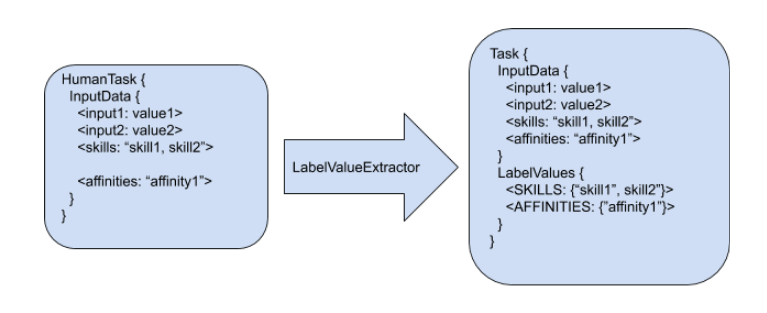
**Labeling mechanism**

The following procedure shows how the labeling mechanism converts information in human tasks and users information to labels:

<img src="https://mintcdn.com/aletyx-3353d50c/Tvhapy25_Fkyd3v9/images/kie-server/KieServerTaskAssigning/LabelingMechanismTasks.png?fit=max&auto=format&n=Tvhapy25_Fkyd3v9&q=85&s=fbcfadf7ce954c9bac9dbe5fd510da01" alt="LabelingMechanismTasks" width="767" height="313" data-path="images/kie-server/KieServerTaskAssigning/LabelingMechanismTasks.png" />

*Tasks Labeling*

1. Any human task is created in the processes runtime.
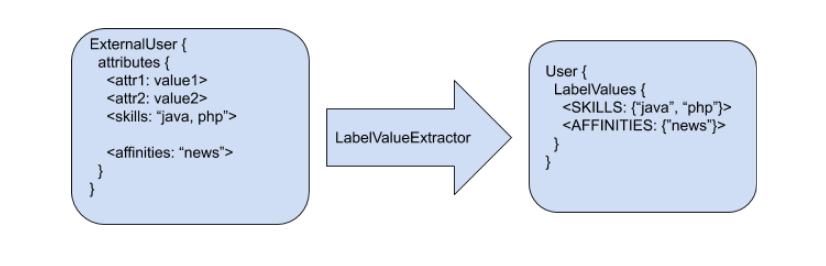
2. When the new task is detected by the task assigning solution refreshing mechanism, a set of LabelValueExtractors is applied.
3. These LabelValueExtractors can transform any piece of information in the human task or user into a label.
4. The default constraints consider these labels.

In the preceding example, the following labels are produced:

* The input data "skills", with the value "skill1, skill2" resulted in the label SKILLS with the following set of values \{"skill1", "skill2"}
* The input data "affinities" with the value "affinity1" resulted in the label AFFINITIES with the following set of values \{"affinity1"}
<Note>
  Task labels are calculated only the first time the task is identified by the task assigning integration and can use any of the information present in the task.
</Note>

User labeling works in a similar way:

<img src="https://mintcdn.com/aletyx-3353d50c/Tvhapy25_Fkyd3v9/images/kie-server/KieServerTaskAssigning/LabelingMechanismUsers.png?fit=max&auto=format&n=Tvhapy25_Fkyd3v9&q=85&s=a41859eca48d23c7c54ea697d590a270" alt="LabelingMechanismUsers" width="826" height="266" data-path="images/kie-server/KieServerTaskAssigning/LabelingMechanismUsers.png" />

*Users Labeling*

#### Default HumanTask and User LabelValueExtractors

Four label value extractors are provided to manage the SKILLS and AFFINITIES labels.

<table>
  <thead>
    <tr>
      <th>Extractor Name</th>
      <th>Description</th>
    </tr>
  </thead>

  <tbody>
    <tr>
      <td>DefaultTaskDataSkillsValueExtractor</td>

      <td>
        <p>Processes the human task "skills" input value as a string of comma separated values, and creates a java `Set<Object>` with tokenized String values.
        The resulting set is assigned to the label SKILLS.</p>
        <p>For example, the "skills" input value "english,finance" is extracted as a set with the values \{"english", "finance"} and assigned to the label with name SKILLS.</p>
        <p>By default extraction can be customized by using the following system property for defining the task input value from where the SKILLS will be extracted.</p>
        <p>For example:
        org.kie.server.services.taskassigning.planning.data.DefaultTaskDataSkillsValueExtractor.skills=someOtherName</p>
      </td>
    </tr>

    <tr>
      <td>DefaultTaskDataAffinitiesValueExtractor</td>

      <td>
        <p>Processes the human task "affinities" input value, as a string of comma separated values, and creates a java `Set<Object>` with tokenized String values. The resulting set is assigned to the label AFFINITIES.</p>
        <p>For example, the "affinities" input value "news,history" is extracted as a set with the values \{"news", "history"} and assigned to the label with name AFFINITIES.</p>
        <p>By default extraction can be customized by using the following system property for defining the task input value from where the AFFINITIES will be extracted.</p>
        <p>For example:
        org.kie.server.services.taskassigning.planning.data.DefaultTaskDataAffinitiesValueExtractor.affinities=someOtherName</p>
      </td>
    </tr>

    <tr>
      <td>DefaultUserSkillsValueExtractor</td>

      <td>
        <p>Analogous to the DefaultTaskDataSkillsValueExtractor.
        By default extraction can be customized by using the following system property for defining the user attribute from where the SKILLS will be extracted.</p>
        <p>For example:
        org.kie.server.services.taskassigning.planning.data.DefaultUserSkillsValueExtractor.skills=someOtherName</p>
      </td>
    </tr>

    <tr>
      <td>DefaultUserAffinitiesValueExtractor</td>

      <td>
        <p>Analogous to the DefaultTaskDataAffinitiesValueExtractor.
        By default extraction can be customized by using the following system property for defining the user attribute from where the AFFINITIES will be extracted.</p>
        <p>For example:
        org.kie.server.services.taskassigning.planning.data.DefaultUserAffinitiesValueExtractor.affinities=someOtherName</p>
      </td>
    </tr>
  </tbody>
</table>

<Note>
  The current core model classes like the TaskAssigningSolution, Task and User might change in future releases.
</Note>

#### Linking the human tasks inputs with the labels

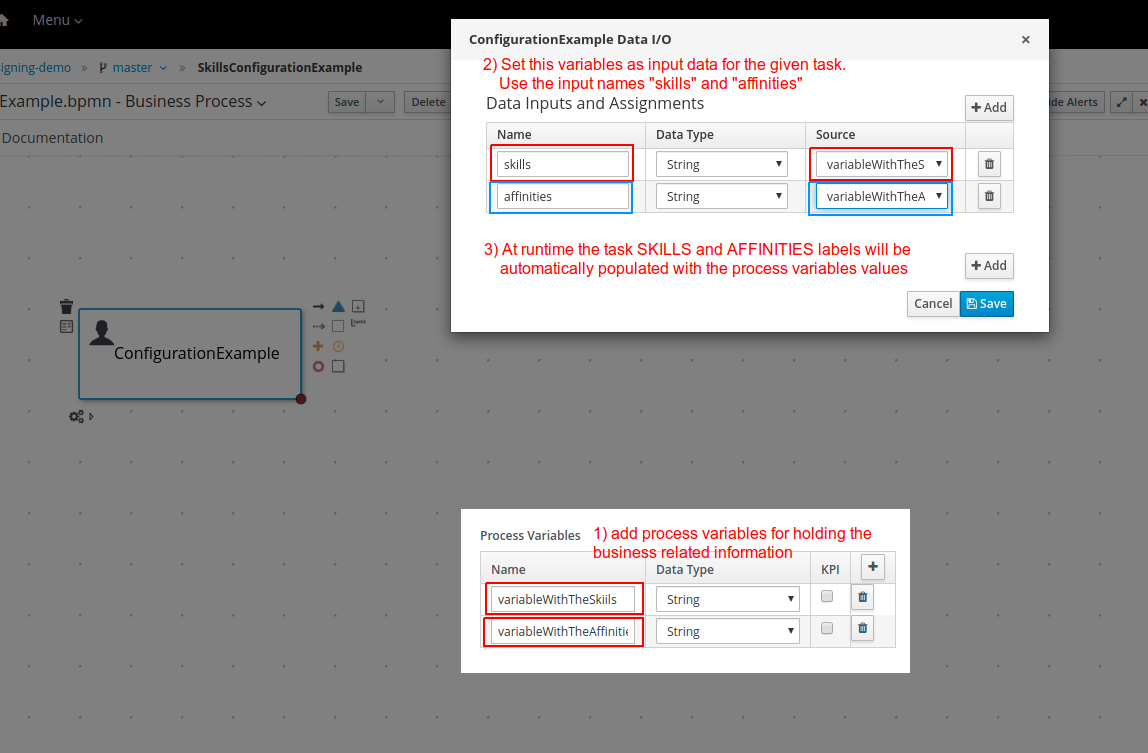
A simple approach for labeling tasks with business related information is implemented using the task inputs configuration. The following image shows an example of such a configuration.

<img src="https://mintcdn.com/aletyx-3353d50c/Tvhapy25_Fkyd3v9/images/kie-server/KieServerTaskAssigning/SkillsAndAffinitiesConfigurationExample.png?fit=max&auto=format&n=Tvhapy25_Fkyd3v9&q=85&s=7aa87b0485d067e9d3fa15d004fd0725" alt="SkillsAndAffinitiesConfigurationExample" width="1148" height="753" data-path="images/kie-server/KieServerTaskAssigning/SkillsAndAffinitiesConfigurationExample.png" />

*Skills and affinities configuration*

The example above links the process variable "variableWithTheSkills" with the task input name "skills", and the corresponding value will be processed by the "DefaultTaskDataSkillsValueExtractor" and automatically associated with the label name SKILLS.

This mechanism can be used for any other user provided LabelValueExtractor.

#### Custom extractors

Installations that require the definition of customized LabelValueExtractors can add them by providing their implementations in the customized KJARs with the [UserSystemIntegration implementation](#container-based-usersystemservice-configuration) or the [Solver configuration](#container-based-solver-configuration).

1. Add a component in the specified KJAR that implements the following interface:

   org.kie.server.api.model.taskassigning.data.LabelValueExtractor

   Note: Ensure that the following dependency is added to the given KJAR:

```xml theme={null}
<dependency>
  <groupId>org.kie.server</groupId>
  <artifactId>kie-server-api</artifactId>
  <version>corresponding version</version>
  <scope>provided</scope>
</dependency>
```

2. Declare the component implementation by using the Java standard service provider mechanism in the following resource:

   project\_home/src/main/resources/META-INF/services/org.kie.server.api.model.taskassigning.data.LabelValueExtractor

When configured, the LabelValueExtractor will be processed accordingly.

The following example shows a custom LabelValueExtractor:

```java theme={null}
import org.kie.server.api.model.taskassigning.data.LabelValueExtractor;
import org.kie.server.services.taskassigning.user.system.api.User;

public class UserExampleValueExtractor implements LabelValueExtractor<User> {

   public Class<User> getType() {
       // consider this extractor for processing users information.
       return org.kie.server.services.taskassigning.user.system.api.User.class;
   }

   public String getLabelName() {
       return "PASSPORT";
   }

   public int getPriority() {
       return 1;
   }

   public Set<Object> extract(User source) {
       Map<String, Object> attributes = source.getAttributes();
       Object value = attributes != null ? attributes.get("passport_number") : null;
       return value != null ? new HashSet<Object>(Collections.singleton(value)) : null;
   }
}
```

Ensure that the following dependency is added to the specified KJAR:

```xml theme={null}
<dependency>
  <groupId>org.kie.server</groupId>
  <artifactId>kie-server-services-task-assigning-user-system-api</artifactId>
  <version>corresponding version</version>
  <scope>provided</scope>
</dependency>
```

<Note>
  Extractors for processing the human tasks information must use the class
  org.kie.server.api.model.taskassigning.TaskData as source type.
</Note>

<Note>
  The current core model classes like the TaskAssigningSolution, Task and User might change in future releases.
</Note>

## Integration alternatives

System integrators usually consume the human tasks available in the [Process Runtime kie-server](#process-runtime-kie-server) for different purposes.
One example is the Business Central "Task Inbox". In this case, Business Central acts as an "integrator" which means that the human tasks are consumed from the [Process Runtime kie-server](#process-runtime-kie-server) by using the kie-server queries APIs and applying different filtering criterias.
Finally these tasks are listed in the "Task Inbox" UI, etc. In this way, Business Central is decoupled from the [Process Runtime kie-server](#process-runtime-kie-server), etc.

The next topics present a set of queries similar to queries used by the Business Central "Task Inbox".
These queries might facilitate integrations in cases where the task assigning integration is enabled.

### Task Assigning Human Tasks Query

This query facilitates the consumption of the available human tasks. The task can integrate additional information depending on the query variant.
It is up to the "integrator" to select the query variant that best supports its needs.

#### Filtering parameters

The available filtering parameters are defined in the following kie-server-api enums:

```java theme={null}
org.kie.server.api.model.definition.TaskField
org.kie.server.api.model.taskassigning.PlanningTaskField
```

Both classes are found in the following maven artifact:

```xml theme={null}
<dependency>
    <groupId>org.kie.server</groupId>
    <artifactId>kie-server-api</artifactId>
</dependency>
```

The following table shows the parameter name and the expected type.

| Parameter         | Type    | Description                                                                                                                                                                                        |
| ----------------- | ------- | -------------------------------------------------------------------------------------------------------------------------------------------------------------------------------------------------- |
| ACTIVATIONTIME    | Date    | Time when this task was activated.                                                                                                                                                                 |
| ACTUALOWNER       | String  | Actual owner assigned to this task - only set when task is claimed.                                                                                                                                |
| CREATEDBY         | String  | User who created this task.                                                                                                                                                                        |
| CREATEDON         | Date    | Date when task was created.                                                                                                                                                                        |
| DEPLOYMENTID      | String  | Deployment id this task is part of, typically the KIE Server container.                                                                                                                            |
| DESCRIPTION       | String  | Description of the task if any.                                                                                                                                                                    |
| DUEDATE           | Date    | Due date set on this task if any.                                                                                                                                                                  |
| NAME              | String  | Name of the task.                                                                                                                                                                                  |
| PARENTID          | Long    | Parent task id if any.                                                                                                                                                                             |
| PRIORITY          | Integer | Priority of the task.                                                                                                                                                                              |
| PROCESSID         | String  | Process definition id that this task belongs to.                                                                                                                                                   |
| PROCESSINSTANCEID | Long    | Process instance id that this task is associated with.                                                                                                                                             |
| PROCESSSESSIONID  | Long    | KieSession id used to create this task.                                                                                                                                                            |
| STATUS            | String  | Current status of the task.                                                                                                                                                                        |
| TASKID            | Long    | Identifier of task.                                                                                                                                                                                |
| WORKITEMID        | Long    | Identifier of work item assigned on process side to this task id.                                                                                                                                  |
| PTTASKID          | Long    | Same value as TASKID.                                                                                                                                                                              |
| ASSIGNEDUSER      | String  | Same value as the ACTUALOWNER for published tasks.                                                                                                                                                 |
| PUBLISHED         | Integer | Indicates if the task is published. For example "published = 1" can be used as filtering criteria in cases of filtering by the task that are currently assigned by the task assigning integration. |

#### Querying the human tasks as TaskData instances

This query execution variant enables getting the result values as instances of:

```java theme={null}
org.kie.server.api.model.taskassigning.TaskData
```

The following example shows how to use this variant:

Example 1)

```java theme={null}
// Create the kie-server query services client.
QueryServicesClient queryServices = createQueryServicesClient();

// Set the filtering and ordering criteria and consider only the currently published tasks.
QueryFilterSpec filter = new QueryFilterSpecBuilder()
    .equalsTo(TaskField.STATUS.toString(), "Reserved", "InProgress", "Completed")
    .equalsTo(PlanningTaskField.PUBLISHED.toString(), 1)
    .oderBy(TaskField.TASKID.toString(), true)
    .get();

// Execute the query
List<TaskData> result = queryServices.query(TaskAssigningQueries.JBPM_HUMAN_TASKS_QUERY,
                                            TaskAssigningQueries.TASK_DATA_QUERY_MAPPER,
                                            filter,
                                            0,    // staring page
                                            30,   // page size
                                            TaskData.class);
```

In this case, only the tasks currently assigned by the task assigning integration will be considered.
This is the usual scenario when task assigning integration is enabled, because it is expected that the tasks are consumed and executed according to the generated planning.

<Note>
  The task inputs and potential owners are not loaded by this query.
</Note>

Example 2)

```java theme={null}
// Create the kie-server query services client.
QueryServicesClient queryServices = createQueryServicesClient();

// Set the filtering and ordering criteria and consider all of the tasks.
QueryFilterSpec filter = new QueryFilterSpecBuilder()
    .equalsTo(TaskField.STATUS.toString(), "Ready”, Reserved", "InProgress", "Completed")
    .oderBy(TaskField.TASKID.toString(), true)
    .get();

// Execute the query
List<TaskData> result = queryServices.query(TaskAssigningQueries.JBPM_HUMAN_TASKS_QUERY,
                                            TaskAssigningQueries.TASK_DATA_QUERY_MAPPER,
                                            filter,
                                            0,    // staring page
                                            30,   // page size
                                            TaskData.class);
```

In this case all of the tasks will be considered but only the tasks assigned by the task assigning integration will have the TaskData.planningTask filled.
It means that non-assigned tasks or tasks not yet managed by the task assigning integration might be included in the results.
This alternative facilitates a more advanced processing of the "potential" tasks, however it is strongly encouraged to make available to the users only the tasks that are currently assigned by the task assigning integration, i.e. the ones with TaskData.planningTask != null, otherwise the integration becomes senseless.

<Note>
  The task inputs and potential owners are not loaded by this query.
</Note>

See KIE Server API documentation for more information on how to create the KIE Server clients and the query API general functioning.

## Examples

### Credit dispute process

The following credit dispute process example is intended to show a simple use case where you can use the "skills" configuration to influence the way tasks are assigned according to the solver constraints and the process data.

<img src="https://mintcdn.com/aletyx-3353d50c/Tvhapy25_Fkyd3v9/images/kie-server/KieServerTaskAssigning/CreditDisputeProcess.png?fit=max&auto=format&n=Tvhapy25_Fkyd3v9&q=85&s=1edb3c0d7a7a9b53c0cdd9bf56c8d81b" alt="CreditDisputeProcess" width="796" height="228" data-path="images/kie-server/KieServerTaskAssigning/CreditDisputeProcess.png" />

*Credit dispute process*

#### Process start

When the process starts, the user is asked to complete the information in the following image.
In particular, the credit card brand for which the dispute is related to and the preferred language for receiving the process notifications are requested.
This information is used for assigning the process tasks.

<img src="https://mintcdn.com/aletyx-3353d50c/Tvhapy25_Fkyd3v9/images/kie-server/KieServerTaskAssigning/StartCreditDisputeForm.png?fit=max&auto=format&n=Tvhapy25_Fkyd3v9&q=85&s=420c3134b546fbd7d41b6a1ded84e0f3" alt="StartCreditDisputeForm" width="832" height="851" data-path="images/kie-server/KieServerTaskAssigning/StartCreditDisputeForm.png" />

*Start credit dispute process form*

#### Process configuration

The following image shows the process variables that are used for holding the card brand and language respectively.

<img src="https://mintcdn.com/aletyx-3353d50c/Tvhapy25_Fkyd3v9/images/kie-server/KieServerTaskAssigning/CreditDisputeProcessWithVariables.png?fit=max&auto=format&n=Tvhapy25_Fkyd3v9&q=85&s=f6e923e24b37d1001fc8ceab565593d7" alt="CreditDisputeProcessWithVariables" width="1317" height="714" data-path="images/kie-server/KieServerTaskAssigning/CreditDisputeProcessWithVariables.png" />

*Credit dispute process variables*

The process start form populates these variables with the user inputs.

#### Resolve dispute task configuration

The following image shows the ResolveDispute task configuration, which establishes that the task input parameter skills is assigned with the value of the process variable cardType.

<img src="https://mintcdn.com/aletyx-3353d50c/Tvhapy25_Fkyd3v9/images/kie-server/KieServerTaskAssigning/ResolveDisputeTaskConfiguration.png?fit=max&auto=format&n=Tvhapy25_Fkyd3v9&q=85&s=af1d73c319d1ecfec3400b6e70482492" alt="ResolveDisputeTaskConfiguration" width="1316" height="734" data-path="images/kie-server/KieServerTaskAssigning/ResolveDisputeTaskConfiguration.png" />

*Resolve dispute task configuration*

With this configuration, OptaPlanner assigns this task to users that meet the following criteria: {/* TODO: Review this */}

1. Are in the user group CreditAnalyst
2. Have all of the skills configured in the task input parameter skills

#### Notify customer task configuration

The following image shows the NotifyCustomer task configuration, which establishes that the task input parameter skills is assigned with the value of the process variable language.

<img src="https://mintcdn.com/aletyx-3353d50c/Tvhapy25_Fkyd3v9/images/kie-server/KieServerTaskAssigning/NotifyCustomerTaskConfiguration.png?fit=max&auto=format&n=Tvhapy25_Fkyd3v9&q=85&s=9f2a672db61c42516abbea1ddd54bd23" alt="NotifyCustomerTaskConfiguration" width="1315" height="717" data-path="images/kie-server/KieServerTaskAssigning/NotifyCustomerTaskConfiguration.png" />

*Notify customer task configuration*

With this configuration OptaPlanner assigns this task to users that meet the following criteria: {/* TODO: Review this */}

1. Are in the group ClientRelations
2. Have all of the skills configured in the task input parameter skills
3. Note that in this case the language selection is optional since the form field is not marked with "\*" [see the process start form](#process-start), meaning that when no language is selected the task won’t have any configured skills.
   This implies that in such cases whatever users that are in group ClientRelations can be assigned to the task.

#### Process execution (example users)

Let’s assume that the following user configurations are used for executing the process.

**users.properties file:**

```java theme={null}
john=analyst,admin,user,Accounting,PM,ClientRelations
mary=analyst,admin,user,ClientRelations
katy=analyst,admin,user,HR,CreditAnalyst
maciek=admin,analyst,user,PM,HR,CreditAnalyst
```

**skills.properties file:**

```java theme={null}
john=ES,EN                     (has skills in the Spanish and English languages)
mary=ZH                        (has skills in the Chinese language)
katy=CITI,MASTER               (has skills in the CITI and MASTER cards)
maciek=VISA,AMERICAN_EXPRESS   (has skills in the VISA and AMERICAN EXPRESS cards)
```

#### Process execution (example instances)

With the preceding configurations the following execution scenarios are expected:

**Process instance #1:**

1. Start process

<img src="https://mintcdn.com/aletyx-3353d50c/Tvhapy25_Fkyd3v9/images/kie-server/KieServerTaskAssigning/StartCreditDisputeInstance1Simple.png?fit=max&auto=format&n=Tvhapy25_Fkyd3v9&q=85&s=071fa6aa800d793929286dbc5df17c12" alt="StartCreditDisputeInstance1Simple" width="807" height="133" data-path="images/kie-server/KieServerTaskAssigning/StartCreditDisputeInstance1Simple.png" />

*Start credit dispute process instance #1*

2. ResolveDispute task

<img src="https://mintcdn.com/aletyx-3353d50c/Tvhapy25_Fkyd3v9/images/kie-server/KieServerTaskAssigning/ResolveDisputeTaskForProcessInstance1WasCreated.png?fit=max&auto=format&n=Tvhapy25_Fkyd3v9&q=85&s=f9acfb26171d0eaa60073caadc5f2d8b" alt="ResolveDisputeTaskForProcessInstance1WasCreated" width="1056" height="228" data-path="images/kie-server/KieServerTaskAssigning/ResolveDisputeTaskForProcessInstance1WasCreated.png" />

*Resolve dispute task for process instance #1*

The ResolveDispute task is assigned to the user maciek since it requires VISA skills.

<Note>
  In real environments there might be many users with this skill. In this case OptaPlanner assigns the newly created task considering the optimized plan, which means that depending on the workload a different user could have been assigned. {/* TODO: Review this */}
</Note>

3. NotifyCustomer task

<img src="https://mintcdn.com/aletyx-3353d50c/Tvhapy25_Fkyd3v9/images/kie-server/KieServerTaskAssigning/NotifyCustomerTaskForProcessInstance1WasCreated.png?fit=max&auto=format&n=Tvhapy25_Fkyd3v9&q=85&s=b8c96e99c6ab58c2a05ecfd4fae33117" alt="NotifyCustomerTaskForProcessInstance1WasCreated" width="1306" height="179" data-path="images/kie-server/KieServerTaskAssigning/NotifyCustomerTaskForProcessInstance1WasCreated.png" />

*Notify customer task for process instance #1*

When the ResolveDispute task is completed, a new task NotifyCustomer is created and assigned to the user john because that task requires skills in Spanish.

**Process instance #2:**

1. Start process

<img src="https://mintcdn.com/aletyx-3353d50c/Tvhapy25_Fkyd3v9/images/kie-server/KieServerTaskAssigning/StartCreditDisputeInstance2Simple.png?fit=max&auto=format&n=Tvhapy25_Fkyd3v9&q=85&s=f9579eade872b70e3cd859e9cc8da080" alt="StartCreditDisputeInstance2Simple" width="811" height="132" data-path="images/kie-server/KieServerTaskAssigning/StartCreditDisputeInstance2Simple.png" />

*Start credit dispute process instance #2*

2. ResolveDispute task

<img src="https://mintcdn.com/aletyx-3353d50c/Tvhapy25_Fkyd3v9/images/kie-server/KieServerTaskAssigning/ResolveDisputeTaskForProcessInstance2WasCreated.png?fit=max&auto=format&n=Tvhapy25_Fkyd3v9&q=85&s=cc10f962b5548f4cc9a90059edf381d9" alt="ResolveDisputeTaskForProcessInstance2WasCreated" width="1302" height="180" data-path="images/kie-server/KieServerTaskAssigning/ResolveDisputeTaskForProcessInstance2WasCreated.png" />

*Resolve dispute task for process instance #2*

The ResolveDispute task is assigned to the user katy since it requires CITI skills.

3. NotifyCustomer task

<img src="https://mintcdn.com/aletyx-3353d50c/Tvhapy25_Fkyd3v9/images/kie-server/KieServerTaskAssigning/NotifyCustomerTaskForProcessInstance2WasCreated.png?fit=max&auto=format&n=Tvhapy25_Fkyd3v9&q=85&s=c281dd362aaf632b36738ffa61de7ce4" alt="NotifyCustomerTaskForProcessInstance2WasCreated" width="1141" height="203" data-path="images/kie-server/KieServerTaskAssigning/NotifyCustomerTaskForProcessInstance2WasCreated.png" />

*Notify customer task for process instance #2*

When the ResolveDispute task is completed, a new task NotifyCustomer is created and assigned to the user mary because that task requires skills in Chinese.

**Process instance #3:**

1. Start process

<img src="https://mintcdn.com/aletyx-3353d50c/Tvhapy25_Fkyd3v9/images/kie-server/KieServerTaskAssigning/StartCreditDisputeInstance3Simple.png?fit=max&auto=format&n=Tvhapy25_Fkyd3v9&q=85&s=7294ec19dfdd94e451f76295a87e1071" alt="StartCreditDisputeInstance3Simple" width="808" height="128" data-path="images/kie-server/KieServerTaskAssigning/StartCreditDisputeInstance3Simple.png" />

*Start credit dispute process instance #3*

2. ResolveDispute task

<img src="https://mintcdn.com/aletyx-3353d50c/Tvhapy25_Fkyd3v9/images/kie-server/KieServerTaskAssigning/ResolveDisputeTaskForProcessInstance3WasCreated.png?fit=max&auto=format&n=Tvhapy25_Fkyd3v9&q=85&s=5a25aa32f02b0d06bf9766e07f19101f" alt="ResolveDisputeTaskForProcessInstance3WasCreated" width="1139" height="208" data-path="images/kie-server/KieServerTaskAssigning/ResolveDisputeTaskForProcessInstance3WasCreated.png" />

*Resolve dispute task for process instance #3*

The ResolveDispute task is assigned to the user katy because that task requires skills in the MASTER card.

3. NotifyCustomer task

<img src="https://mintcdn.com/aletyx-3353d50c/Tvhapy25_Fkyd3v9/images/kie-server/KieServerTaskAssigning/NotifyCustomerTaskForProcessInstance3WasCreated.png?fit=max&auto=format&n=Tvhapy25_Fkyd3v9&q=85&s=7eafdd2da10ffad2f102d4e19325cf7a" alt="NotifyCustomerTaskForProcessInstance3WasCreated" width="1194" height="181" data-path="images/kie-server/KieServerTaskAssigning/NotifyCustomerTaskForProcessInstance3WasCreated.png" />

*Notify customer task for process instance #3*

When the ResolveDispute task is completed, a new task NotifyCustomer is created and assigned to the planninguser because none of the users has the required skills in Hindi.
In this case, an external interaction is required to determine the best suited user to complete the task. The planninguser must perform this action by delegating the task.

<Note>
  The planninguser assignment is used to cover edge cases and should not be part of the modelling strategy.
  In the preceding example, if it is known that no user will have skills in Hindi, a similar but softer constraint can be configured by using affinities.
</Note>

### Customized User System Service

For creating a custom user system service implementation follow these steps:

1. Create a KJAR project structure

2. Add the following dependency

```xml theme={null}
<dependency>
  <!-- Kie Server, OptaPlanner, or any other product dependencies must use provided scope -->
  <groupId>org.kie.server</groupId>
    <artifactId>kie-server-services-task-assigning-user-system-api</artifactId>
    <version>configure the proper version number aligned with the target kie-server</version>
    <scope>provided</scope>
</dependency>
```

3. Provide your UserSystemService implementation, see the following example:

```java theme={null}
public class MyDBUserSystemService implements UserSystemService {

    private DataSource dataSource;

    public String getName() {
        return "MyDBUserSystemService";
    }

    public void start() {
        String dataSourceName = System.getProperty("org.example.DBUserSystemService.ds",
                                                   "java:jboss/datasources/ExampleDS");
        try {
            InitialContext initialContext = new InitialContext();
            dataSource = (DataSource) initialContext.lookup(dataSourceName);
        } catch (NamingException e) {
             // throw an exception if there are unrecoverable errors that prevent
             // the service to start.
            throw new DBUserSystemServiceException("Unable to find data source under name " +
                                                   dataSourceName, e);
       }
    }

    public void test() throws Exception {
         // test your database queries etc.
    }

    public List<User> findAllUsers() {
        try (Connection conn = dataSource.getConnection()) {
            List<User> myUsers;
            // query the users information from the database.
           return myUsers;
       } catch (SQLException e) {
           throw new DBUserSystemServiceException("An error was produced finding all users: " +
                                                  e.getMessage(), e);
       }
   }

    public User findUser(String userId) {
        if (userId == null) {
            return null;
        }
        try (Connection conn = dataSource.getConnection()) {
            User user;
            // query the user information from the database.
            return user;
        } catch (SQLException e) {
          throw new DBUserSystemServiceException("An error was produced finding user: "+
                                                  e.getMessage(), e);
        }
    }
}
```

4. Add the following resource to the project and declare your user system service provider class on it.

```java theme={null}
src/main/resources/META-INF/services/org.kie.server.services.taskassigning.user.system.api.UserSystemService

org.example.MyDBUserSystemService
```

Finally, for using it in the [Planning kie-server](#planning-kie-server) follow these steps:

1. Build your KJAR and be sure the corresponding maven generated artifact is installed in the maven repository used by your [Planning kie-server](#planning-kie-server).

2. Add a datasource configuration to your [Planning kie-server](#planning-kie-server) pointing to the target DB
   (this step is only required for the example above).
   For example with JNDI name java:jboss/datasources/db-user-system-datasource

3. Finally add the following items to the [Planning kie-server](#planning-kie-server) configuration file:

```xml theme={null}
<server>
...
<system-properties>
  <property name="org.kie.server.taskAssigning.userSystem.name"
            value="MyDBUserSystemService" />
  <property name="org.kie.server.taskAssigning.userSystem.container.id"
            value="my-db-user-system-container" />
  <property name="org.kie.server.taskAssigning.userSystem.container.groupId"
            value="your KJARs groupId" />
  <property name="org.kie.server.taskAssigning.userSystem.container.artifactId"
            value="your KJARs artifactId" />
  <property name="org.kie.server.taskAssigning.userSystem.container.version"
            value="your KJARs version number" />
  <property name="org.example.DBUserSystemService.ds"
            value="java:jboss/datasources/db-user-system-datasource" />
</system-properties>
...
</server>
```