> ## Documentation Index
> Fetch the complete documentation index at: https://aletyx.ai/docs/llms.txt
> Use this file to discover all available pages before exploring further.
# KIE Server setup
> Set up KIE Server in managed mode with a jBPM controller or as an unmanaged standalone instance.
**Important**
Server setup and registration changed significantly from versions 6.2 and before.
The following applies only to version 6.3 and forward.
## Managed KIE Server
A managed instance is one that requires a jBPM controller to be available to properly start up the KIE Server instance.
The jBPM controller is a component responsible for keeping and managing a KIE Server configuration in a centralized way.
Each jBPM controller can manage multiple configurations at once and there can be multiple jBPM controllers in the environment.
Managed KIE Servers can be configured with a list of jBPM controllers but will connect to only one at a time.
It's important to mention that even though there can be multiple
jBPM controllers, they should be kept in sync to make sure that regardless of
which one of them is contacted by a KIE Server instance, it will provide the
same set of configuration.
At startup, if a KIE Server is configured with a list of jBPM controllers, it will try successively to connect to each of them until a connection is successfully established with one of them.
If for any reason a connection can't be established, the server will not start, even if there is local storage available with configuration.
This happens by design in order to ensure consistency.
For instance, if the KIE Server was down and the configuration has changed, this restriction guarantees that it will run with an up-to-date configuration or not at all.
In order to run the KIE Server in standalone mode, without connecting to
any jBPM controllers, please see "Unmanaged KIE Execution Server".
The configuration sets, among other things:
* KIE containers to be deployed and started
* configuration items - currently this is a placeholder for further enhancements that will allow remotely configuring KIE Execution Server components - timers, persistence, etc
The jBPM controller, besides providing configuration management, is also responsible for overall management of KIE Servers.
It provides a REST API that is divided into two parts:
* the jBPM controller itself that is exposed to interact with KIE Execution Server instances
* an administration API that allows you to remotely manage KIE Server instances:
* add/remove servers
* add/remove containers to/from the servers
* start/stop containers on servers
The jBPM controller deals only with the KIE Server configuration, or definition to put it differently.
It does not handle any runtime components of KIE Execution Server instances.
They are always considered remote to the jBPM controller.
The jBPM controller is responsible for persisting the configuration so that it is preserved across restarts of the jBPM controller itself.
It should manage the synchronization as well, in case multiple jBPM controllers are configured, to keep all definitions up to date on all instances of the jBPM controller.
By default, the jBPM controller is shipped with Business Central and provides a fully featured management interface (both REST API and UI). It uses the underlying Git repository as a persistent store, and thus when Git repositories are clustered (using Apache Zookeeper and Apache Helix) it will cover the jBPM controllers synchronization as well.
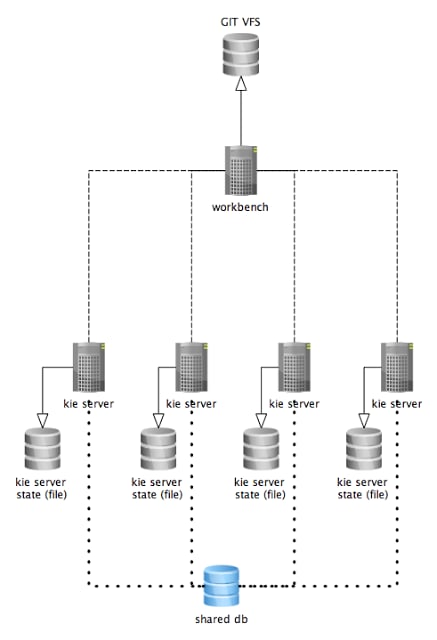 The diagram above illustrates the single jBPM controller (Business Central) setup with multiple KIE Server instances managed by it.
The diagram below illustrates the clustered setup where there are multiple instances of jBPM controller synchronized over Zookeeper.
The diagram above illustrates the single jBPM controller (Business Central) setup with multiple KIE Server instances managed by it.
The diagram below illustrates the clustered setup where there are multiple instances of jBPM controller synchronized over Zookeeper.
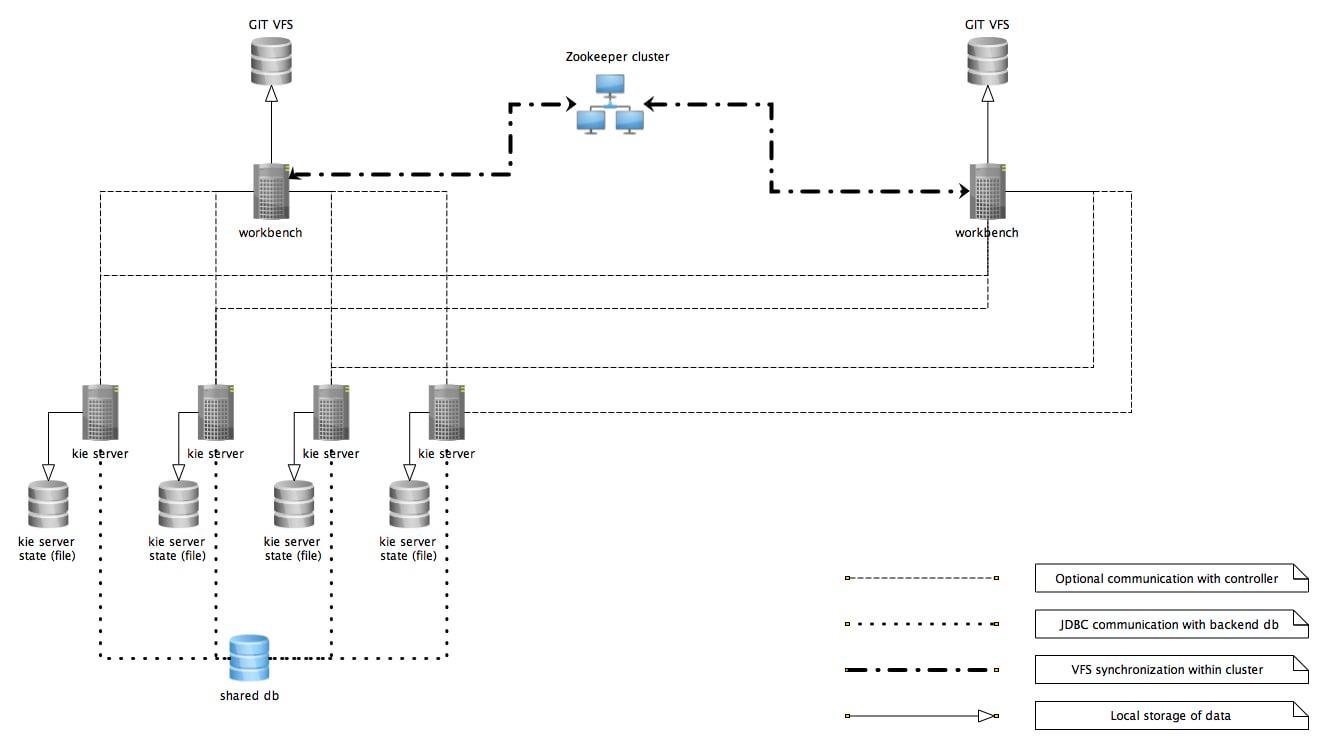 In the above diagram we can see that the KIE Server instances are capable of connecting to any of the jBPM controllers, but they will connect to only one.
Each instance will attempt to connect to a jBPM controller as long as it can reach one.
Once a connection is established with one of the jBPM controllers, it will skip the others.
### Working with managed servers
There are two approaches that users can take when working with managed KIE Server instances:
* *Configuration first:* with this approach, a user will start working with the jBPM controller (either UI or REST API) and create and configure KIE Server definitions. That consists basically of an identification for the server definition (id and name + optionally version for improved readability) and the configuration for the KIE containers to run on the server.
* *Registration first:* with this approach, the KIE Server instances are started first and auto register themselves on the jBPM controller. The user can then configure the KIE containers. This option simply skips the registration step done in the first approach and populates it with server id, name and version directly upon auto registration. There are no other differences between the two approaches.
## Unmanaged KIE Execution Server
An unmanaged KIE Server is in turn just a standalone instance, and thus must be configured individually using the REST/JMS API from the KIE Server itself.
There is no jBPM controller involved.
The configuration is automatically persisted by the server into a file and that is used as the internal server state, in case of restarts.
The configuration is updated during the following operations:
* deploy KIE container
* undeploy KIE container
* start KIE container
* stop KIE container
If the KIE Server is restarted, it will try to establish the same state
that was persisted before shutdown. That means that KIE containers that were
running will be started, but the ones that were stopped/disposed before will not.
In most use cases, the KIE Server should be executed in managed mode as that provides some benefits, like a web user interface (if using Business Central as a jBPM controller) and some facilities for clustering.
In the above diagram we can see that the KIE Server instances are capable of connecting to any of the jBPM controllers, but they will connect to only one.
Each instance will attempt to connect to a jBPM controller as long as it can reach one.
Once a connection is established with one of the jBPM controllers, it will skip the others.
### Working with managed servers
There are two approaches that users can take when working with managed KIE Server instances:
* *Configuration first:* with this approach, a user will start working with the jBPM controller (either UI or REST API) and create and configure KIE Server definitions. That consists basically of an identification for the server definition (id and name + optionally version for improved readability) and the configuration for the KIE containers to run on the server.
* *Registration first:* with this approach, the KIE Server instances are started first and auto register themselves on the jBPM controller. The user can then configure the KIE containers. This option simply skips the registration step done in the first approach and populates it with server id, name and version directly upon auto registration. There are no other differences between the two approaches.
## Unmanaged KIE Execution Server
An unmanaged KIE Server is in turn just a standalone instance, and thus must be configured individually using the REST/JMS API from the KIE Server itself.
There is no jBPM controller involved.
The configuration is automatically persisted by the server into a file and that is used as the internal server state, in case of restarts.
The configuration is updated during the following operations:
* deploy KIE container
* undeploy KIE container
* start KIE container
* stop KIE container
If the KIE Server is restarted, it will try to establish the same state
that was persisted before shutdown. That means that KIE containers that were
running will be started, but the ones that were stopped/disposed before will not.
In most use cases, the KIE Server should be executed in managed mode as that provides some benefits, like a web user interface (if using Business Central as a jBPM controller) and some facilities for clustering.