> ## Documentation Index
> Fetch the complete documentation index at: https://aletyx.ai/docs/llms.txt
> Use this file to discover all available pages before exploring further.
# Lab: Let's Orchestrate Rules and Decisions in Aletyx Enterprise Build of Kogito and Drools 10.1.0-aletyx
> Create a BPMN process that orchestrates a DMN decision and a DRL RuleUnit to validate a driver's license and evaluate traffic violations.
The workflow use case started within Apache KIE many, many, years ago to cover exactly this use case: orchestrate complex rule sets. Back in the day, there was no concept of RuleUnits nor DMN, it was a very good way to visualize and organize rule-set orchestration by leveraging a graphical model notation.
It started with a RuleFlow file (.rf), but quickly Apache KIE evolved and fully embraced the BPMN format. Aletyx Enterprise Build of Kogito and Drools embraces the history of these evolutions and this lab will show the first part of that evolution.
## Lab Overview
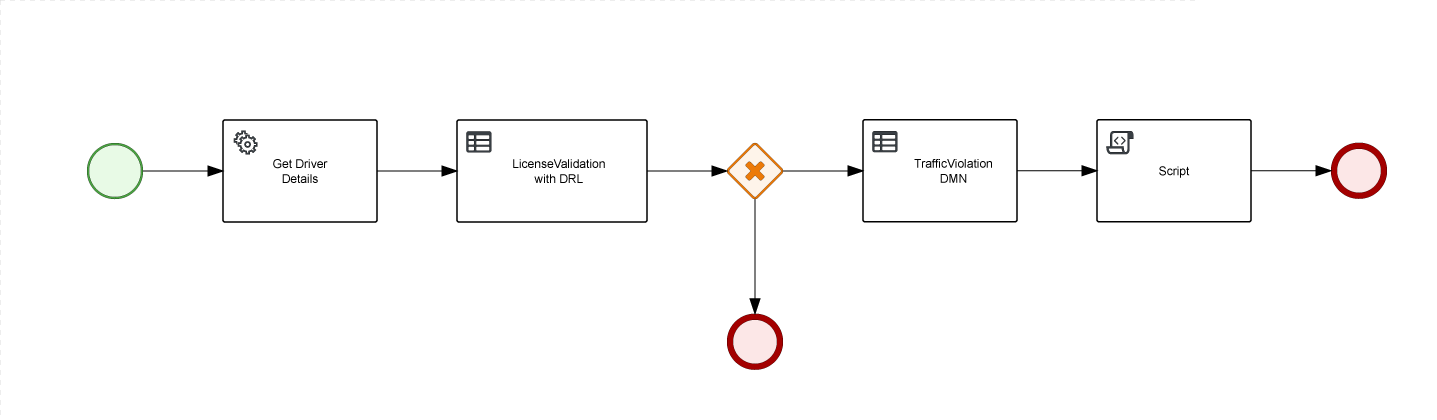
You will create a BPMN process that will orchestrate 1 DMN decision and 1 DRL RuleUnit.
1. Get Driver information (could be from a Database)
2. Validate the driver's license based on expiration date
3. If valid, we'll check if the driver's license should be suspended based on the Traffic Violation
 ### Supporting Files
The Java services provided in the repository [https://github.com/aletyx-labs/kie-10.0.0-lab-rules-orchestration](https://github.com/aletyx-labs/kie-10.0.0-lab-rules-orchestration) contain the infrastructure to support this process. Below is a brief description of each file:
#### Driver.java
Represents a driver entity with personal details and license status.
* Attributes include `id`, `name`, `state`, `city`, `points`, `age`, and `licenseExpiration`.
* Tracks whether the driver has a valid license (`validLicense`).
* Includes getter and setter methods for all attributes.
#### DriverService.java
Service responsible for retrieving driver information.
* `getDriver(driverId)`: Retrieves driver details, potentially from an external service or database.
* Mocks driver data, including randomly determining license expiration based on the driver's ID. This could be a database access to retrieve such information.
#### Fine.java
Represents a traffic fine with associated penalties.
* Attributes:
* `amount`: Monetary fine imposed.
* `points`: The number of penalty points added to the driver's record.
* Includes getter and setter methods.
#### LicenseValidationService.java
RuleUnitData that provides single driver for validation using rule-based decision-making.
* Uses `SingletonStore` to manage a single driver's data.
* Provides methods to set and retrieve driver data.
* Includes `getCurrentTime()` to return the current timestamp.
#### Violation.java
Represents a traffic violation event.
* Attributes:
* `code`: Unique identifier for the violation.
* `date`: Date when the violation occurred.
* `type`: Type of violation (e.g., speeding).
* `speedLimit`: Allowed speed for the road.
* `actualSpeed`: Speed at which the driver was caught.
* Includes a constructor and getter/setter methods.
#### LicenseValidationService.drl
File that provides all Rules for LicenseValidationService unit. In this case there're two simple rules that validates the driver's license based on expiration date.
`driver` and `currentTime` are provided by LicenseValidationService unit.
#### TrafficViolation.dmn
Decision that evaluates if a driver should be suspended or not. It takes the Driver and a Violation as input data, evaluates the fine for the violation and using the result of the Fine decision, defines if the Driver should be suspended or not.
### Instructions
#### Step 1: Clone the Repository
Clone the lab project from this repository, which contains all the necessary files and infrastructure for the lab.
#### Step 2: Import the Project
Import the project into VS Code and explore the provided Java classes.
#### Step 3: Create the BPMN file
Create a new file name traffic.bpmn under src/main/resources and open it using the Apache KIE BPMN Editor.
Once file is created, create the process variables that we'll need.
| Name | Data Type |
| --------- | ---------------------------------------------------- |
| suspended | String |
| driverId | String |
| violation | ai.aletyx.kie.workshop.rules.orchestration.Violation |
| driver | ai.aletyx.kie.workshop.rules.orchestration.Driver |
| fine | ai.aletyx.kie.workshop.rules.orchestration.Fine |
#### Step 4: Create the process diagram
Our goal is to orchestrate the DRLs and the DMN, we'll load Driver content based on it, evaluate the license with DRL and then we'll run the DMN.
In general this is the nodes you'll have to create:
1. Start Event: Initiates the traffic rules orchestration process.
2. Get Driver Details Service Task
**Interface**: ai.aletyx.kie.workshop.rules.orchestration.DriverService
**Operation**: getDriver
**Variables - Input Mapping**:
| Name | Data Type | Source |
| ------ | --------- | -------- |
| param1 | String | driverId |
**Variables - Output Mapping**:
| Name | Data Type | Target |
| ------ | ---------------------------------------------------- | ------ |
| result | Driver \[ai.aletyx.kie.workshop.rules.orchestration] | driver |
3. LicenseValidation with DRL Business Rules Task
**Rule Language**: DRL
**Rule Flow Group**: unit:ai.aletyx.kie.workshop.rules.orchestration.LicenseValidationService
**Variables - Input Mapping**:
| Name | Data Type | Source |
| ------ | ---------------------------------------------------- | ------ |
| driver | Driver \[ai.aletyx.kie.workshop.rules.orchestration] | driver |
**Variables - Output Mapping**:
| Name | Data Type | Target |
| ------ | ---------------------------------------------------- | ------ |
| driver | Driver \[ai.aletyx.kie.workshop.rules.orchestration] | driver |
4. Exclusive Gateway: We'll check if the Service was successful or not.
* On Fail
```java theme={null}
return !driver.isValidLicense();
```
4.1. End event
* On Success
```java theme={null}
return driver.isValidLicense();
```
4.2. TrafficViolation DMN Business Rules Task
**Rule Language**: DMN
**Namespace**: [https://github.com/kiegroup/drools/kie-dmn/\_A4BCA8B8-CF08-433F-93B2-A2598F19ECFF](https://github.com/kiegroup/drools/kie-dmn/_A4BCA8B8-CF08-433F-93B2-A2598F19ECFF)
**Decision Name**: Traffic Violation
**DMN Model Name**: Traffic Violation
**Variables - Input Mapping**:
| Name | Data Type | Source |
| --------- | ------------------------------------------------------- | --------- |
| Violation | Violation \[ai.aletyx.kie.workshop.rules.orchestration] | violation |
| Driver | Driver \[ai.aletyx.kie.workshop.rules.orchestration] | driver |
**Variables - Output Mapping**:
| Name | Data Type | Target |
| --------- | -------------------------------------------------- | --------- |
| Suspended | String | suspended |
| Fine | Fine \[ai.aletyx.kie.workshop.rules.orchestration] | fine |
4.3. Script Task
Script:
```java theme={null}
System.out.println("Result for suspension: " + suspended);
System.out.println("Result for fine: " + fine);
```
4.4. End Event
#### Step 5: Test the Process
You can also use the following code to test:
```java theme={null}
import java.math.BigDecimal;
import java.util.HashMap;
import java.util.Map;
import org.junit.jupiter.api.Test;
import io.quarkus.test.junit.QuarkusTest;
import io.restassured.http.ContentType;
import static io.restassured.RestAssured.given;
import static org.hamcrest.Matchers.is;
@QuarkusTest
public class TrafficProcessTest {
public static final BigDecimal SPEED_LIMIT = new BigDecimal(100);
@Test
public void testTrafficViolationEmbeddedDecisionOnQuarkus() {
testTrafficProcess("traffic", "12345", 120d, "No", true);
testTrafficProcess("traffic", "12345", 140d, "Yes", true);
testTrafficProcess("traffic", "1234", 140d, null, false);
}
private void testTrafficProcess(String processId, String driverId, Double speed, String suspended, Boolean validLicense) {
Map request = new HashMap<>();
request.put("driverId", driverId);
request.put("violation", new Violation("speed", SPEED_LIMIT, new BigDecimal(speed)));
given()
.body(request)
.contentType(ContentType.JSON)
.when()
.post("/" + processId)
.then()
.statusCode(201)
.body("suspended", is(suspended))
.body("driver.validLicense", is(validLicense));
}
}
```
### Supporting Files
The Java services provided in the repository [https://github.com/aletyx-labs/kie-10.0.0-lab-rules-orchestration](https://github.com/aletyx-labs/kie-10.0.0-lab-rules-orchestration) contain the infrastructure to support this process. Below is a brief description of each file:
#### Driver.java
Represents a driver entity with personal details and license status.
* Attributes include `id`, `name`, `state`, `city`, `points`, `age`, and `licenseExpiration`.
* Tracks whether the driver has a valid license (`validLicense`).
* Includes getter and setter methods for all attributes.
#### DriverService.java
Service responsible for retrieving driver information.
* `getDriver(driverId)`: Retrieves driver details, potentially from an external service or database.
* Mocks driver data, including randomly determining license expiration based on the driver's ID. This could be a database access to retrieve such information.
#### Fine.java
Represents a traffic fine with associated penalties.
* Attributes:
* `amount`: Monetary fine imposed.
* `points`: The number of penalty points added to the driver's record.
* Includes getter and setter methods.
#### LicenseValidationService.java
RuleUnitData that provides single driver for validation using rule-based decision-making.
* Uses `SingletonStore` to manage a single driver's data.
* Provides methods to set and retrieve driver data.
* Includes `getCurrentTime()` to return the current timestamp.
#### Violation.java
Represents a traffic violation event.
* Attributes:
* `code`: Unique identifier for the violation.
* `date`: Date when the violation occurred.
* `type`: Type of violation (e.g., speeding).
* `speedLimit`: Allowed speed for the road.
* `actualSpeed`: Speed at which the driver was caught.
* Includes a constructor and getter/setter methods.
#### LicenseValidationService.drl
File that provides all Rules for LicenseValidationService unit. In this case there're two simple rules that validates the driver's license based on expiration date.
`driver` and `currentTime` are provided by LicenseValidationService unit.
#### TrafficViolation.dmn
Decision that evaluates if a driver should be suspended or not. It takes the Driver and a Violation as input data, evaluates the fine for the violation and using the result of the Fine decision, defines if the Driver should be suspended or not.
### Instructions
#### Step 1: Clone the Repository
Clone the lab project from this repository, which contains all the necessary files and infrastructure for the lab.
#### Step 2: Import the Project
Import the project into VS Code and explore the provided Java classes.
#### Step 3: Create the BPMN file
Create a new file name traffic.bpmn under src/main/resources and open it using the Apache KIE BPMN Editor.
Once file is created, create the process variables that we'll need.
| Name | Data Type |
| --------- | ---------------------------------------------------- |
| suspended | String |
| driverId | String |
| violation | ai.aletyx.kie.workshop.rules.orchestration.Violation |
| driver | ai.aletyx.kie.workshop.rules.orchestration.Driver |
| fine | ai.aletyx.kie.workshop.rules.orchestration.Fine |
#### Step 4: Create the process diagram
Our goal is to orchestrate the DRLs and the DMN, we'll load Driver content based on it, evaluate the license with DRL and then we'll run the DMN.
In general this is the nodes you'll have to create:
1. Start Event: Initiates the traffic rules orchestration process.
2. Get Driver Details Service Task
**Interface**: ai.aletyx.kie.workshop.rules.orchestration.DriverService
**Operation**: getDriver
**Variables - Input Mapping**:
| Name | Data Type | Source |
| ------ | --------- | -------- |
| param1 | String | driverId |
**Variables - Output Mapping**:
| Name | Data Type | Target |
| ------ | ---------------------------------------------------- | ------ |
| result | Driver \[ai.aletyx.kie.workshop.rules.orchestration] | driver |
3. LicenseValidation with DRL Business Rules Task
**Rule Language**: DRL
**Rule Flow Group**: unit:ai.aletyx.kie.workshop.rules.orchestration.LicenseValidationService
**Variables - Input Mapping**:
| Name | Data Type | Source |
| ------ | ---------------------------------------------------- | ------ |
| driver | Driver \[ai.aletyx.kie.workshop.rules.orchestration] | driver |
**Variables - Output Mapping**:
| Name | Data Type | Target |
| ------ | ---------------------------------------------------- | ------ |
| driver | Driver \[ai.aletyx.kie.workshop.rules.orchestration] | driver |
4. Exclusive Gateway: We'll check if the Service was successful or not.
* On Fail
```java theme={null}
return !driver.isValidLicense();
```
4.1. End event
* On Success
```java theme={null}
return driver.isValidLicense();
```
4.2. TrafficViolation DMN Business Rules Task
**Rule Language**: DMN
**Namespace**: [https://github.com/kiegroup/drools/kie-dmn/\_A4BCA8B8-CF08-433F-93B2-A2598F19ECFF](https://github.com/kiegroup/drools/kie-dmn/_A4BCA8B8-CF08-433F-93B2-A2598F19ECFF)
**Decision Name**: Traffic Violation
**DMN Model Name**: Traffic Violation
**Variables - Input Mapping**:
| Name | Data Type | Source |
| --------- | ------------------------------------------------------- | --------- |
| Violation | Violation \[ai.aletyx.kie.workshop.rules.orchestration] | violation |
| Driver | Driver \[ai.aletyx.kie.workshop.rules.orchestration] | driver |
**Variables - Output Mapping**:
| Name | Data Type | Target |
| --------- | -------------------------------------------------- | --------- |
| Suspended | String | suspended |
| Fine | Fine \[ai.aletyx.kie.workshop.rules.orchestration] | fine |
4.3. Script Task
Script:
```java theme={null}
System.out.println("Result for suspension: " + suspended);
System.out.println("Result for fine: " + fine);
```
4.4. End Event
#### Step 5: Test the Process
You can also use the following code to test:
```java theme={null}
import java.math.BigDecimal;
import java.util.HashMap;
import java.util.Map;
import org.junit.jupiter.api.Test;
import io.quarkus.test.junit.QuarkusTest;
import io.restassured.http.ContentType;
import static io.restassured.RestAssured.given;
import static org.hamcrest.Matchers.is;
@QuarkusTest
public class TrafficProcessTest {
public static final BigDecimal SPEED_LIMIT = new BigDecimal(100);
@Test
public void testTrafficViolationEmbeddedDecisionOnQuarkus() {
testTrafficProcess("traffic", "12345", 120d, "No", true);
testTrafficProcess("traffic", "12345", 140d, "Yes", true);
testTrafficProcess("traffic", "1234", 140d, null, false);
}
private void testTrafficProcess(String processId, String driverId, Double speed, String suspended, Boolean validLicense) {
Map request = new HashMap<>();
request.put("driverId", driverId);
request.put("violation", new Violation("speed", SPEED_LIMIT, new BigDecimal(speed)));
given()
.body(request)
.contentType(ContentType.JSON)
.when()
.post("/" + processId)
.then()
.statusCode(201)
.body("suspended", is(suspended))
.body("driver.validLicense", is(validLicense));
}
}
```